

Track Contractor Hours Across Every Client Site
Your staffing agency places contractors at multiple client sites. HiveDesk tracks every hour by client, generates verified timesheets for billing, takes screenshots as proof of work, and gives you real-time visibility into your entire workforce. All for $5/user/month.
No credit card required · 14-day free trial · $5/user/month

Staffing Agency Challenges That Cost You Money
When contractors work across multiple client sites, manual time tracking leads to billing disputes, payroll errors, and zero visibility into your workforce.
Without staffing time tracking software
- Contractors at different client sites track hours on paper or spreadsheets
- No way to verify hours worked when clients question invoices
- Timesheets arrive late, incomplete, or with errors
- Billing disputes erode client trust and delay payments
- No visibility into which contractors are working right now
- Payroll calculations require hours of manual reconciliation
With HiveDesk
- Contractors track hours automatically with one-click timers per client project
- Periodic screenshots provide timestamped proof of work for every hour billed
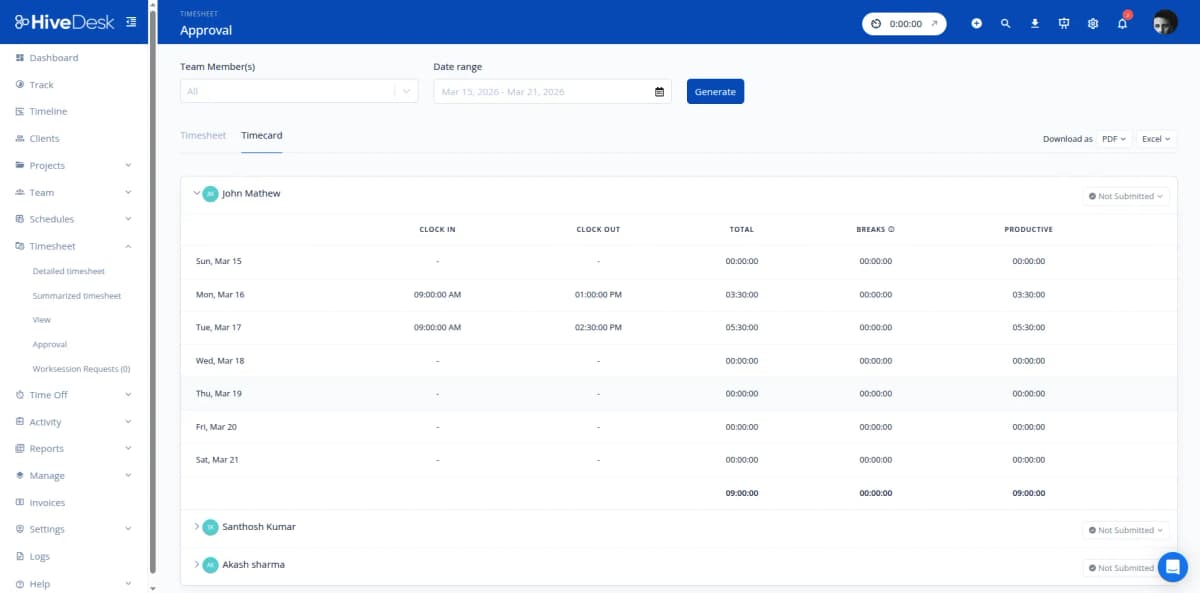
- Timesheets are generated automatically and ready for manager approval
- Per-client reports resolve billing disputes before they escalate
- Real-time dashboard shows all active contractors across every client site
- Approved timesheets export directly to Excel for payroll processing
Multi-Client Management
One contractor, multiple clients, accurate hours
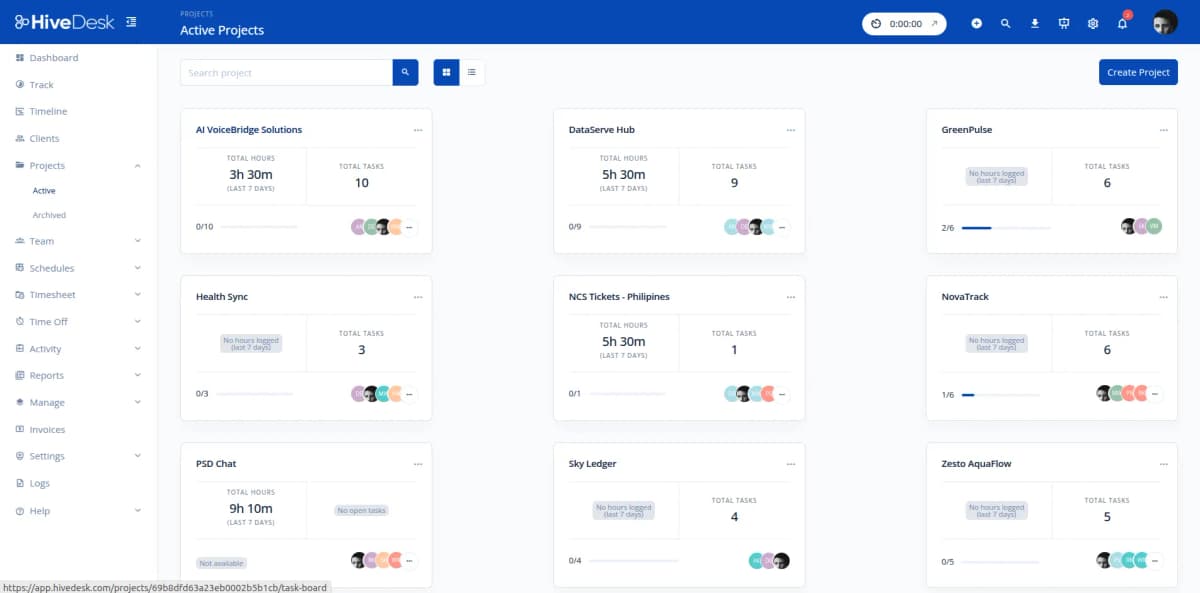
Staffing agencies bill by the client. Every hour needs to be allocated to the right account. HiveDesk lets you create separate projects for each client placement, so contractors track time against the correct client automatically. No more cross-client billing errors.
- Create projects for each client placement or site
- Contractors switch between client projects with one click
- Hours automatically allocated to the correct client account
- Generate per-client timesheets and activity reports
- Dashboard shows hours by client in real time
Verified Timesheets for Clients
Bill clients with proof, not promises
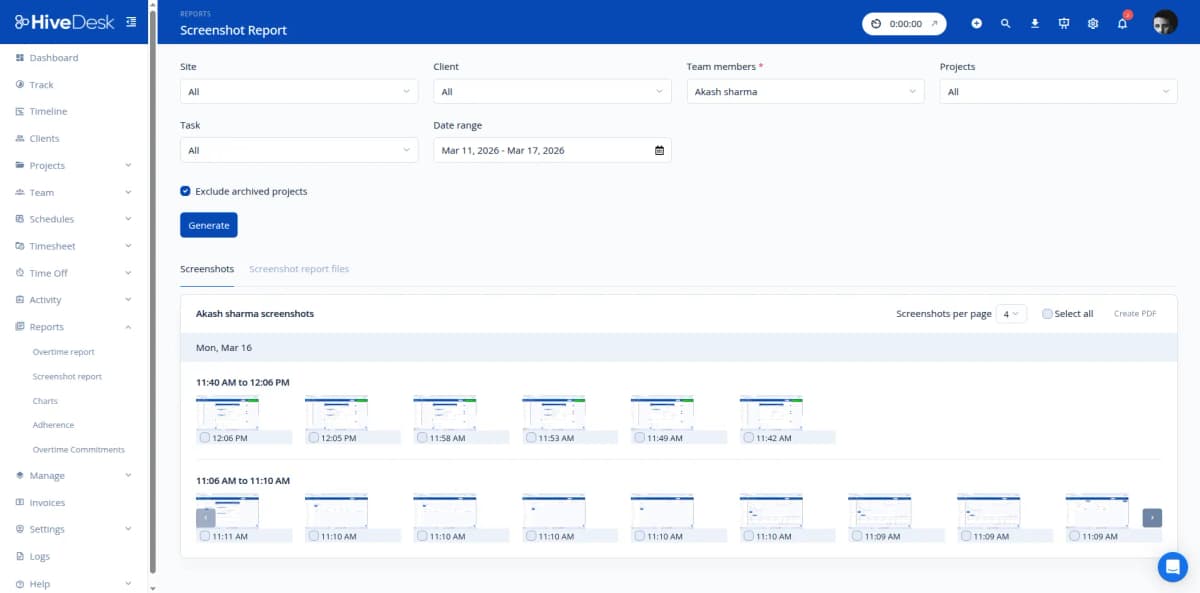
When clients question an invoice, you need more than a spreadsheet. HiveDesk gives you verified time records backed by periodic screenshots that show exactly what contractors were working on. Share PDF screenshot reports with clients to eliminate billing disputes and build trust.
- Periodic screenshots as timestamped proof of work
- PDF screenshot reports you can share with clients
- Activity levels show keyboard and mouse engagement
- Per-client timesheet exports for transparent invoicing
- Eliminate disputes over hours billed
Contractor Scheduling
Schedule contractors across client sites
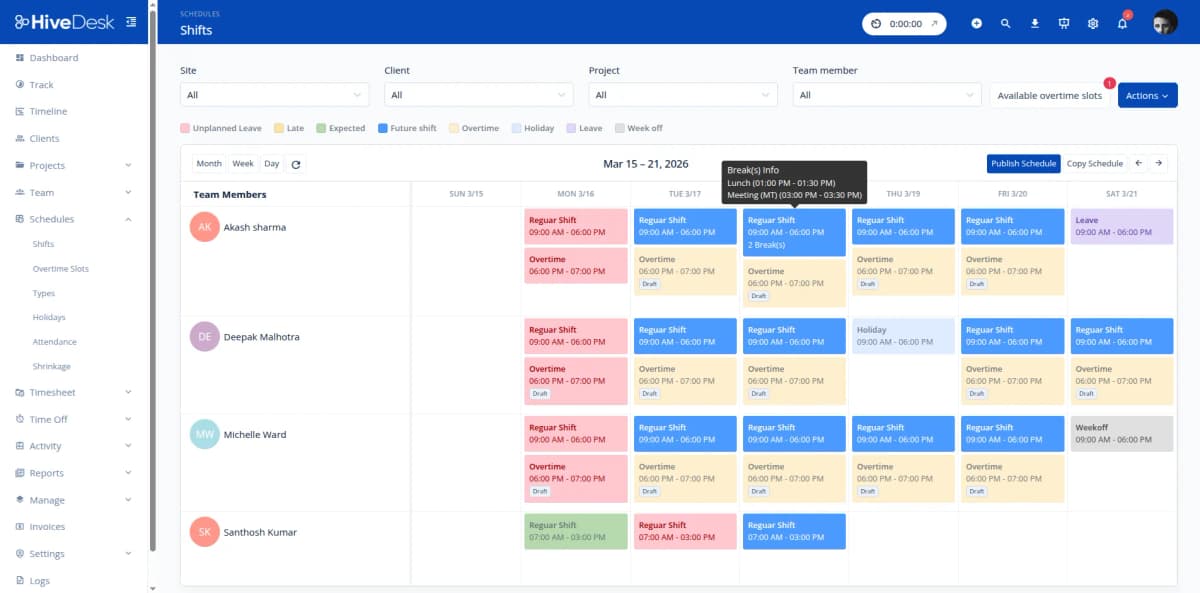
Staffing agencies need to manage contractor availability, assign shifts at client locations, and track schedule adherence. HiveDesk gives you shift scheduling, attendance monitoring, and leave management so you always know who is available and where they are assigned.
- Create and assign shifts by client site
- Track contractor attendance and schedule adherence
- Manage time-off requests and contractor availability
- Multi-timezone support for distributed placements
- Identify coverage gaps before they affect client service
Payroll & Client Billing
From tracked hours to payroll and invoices in minutes
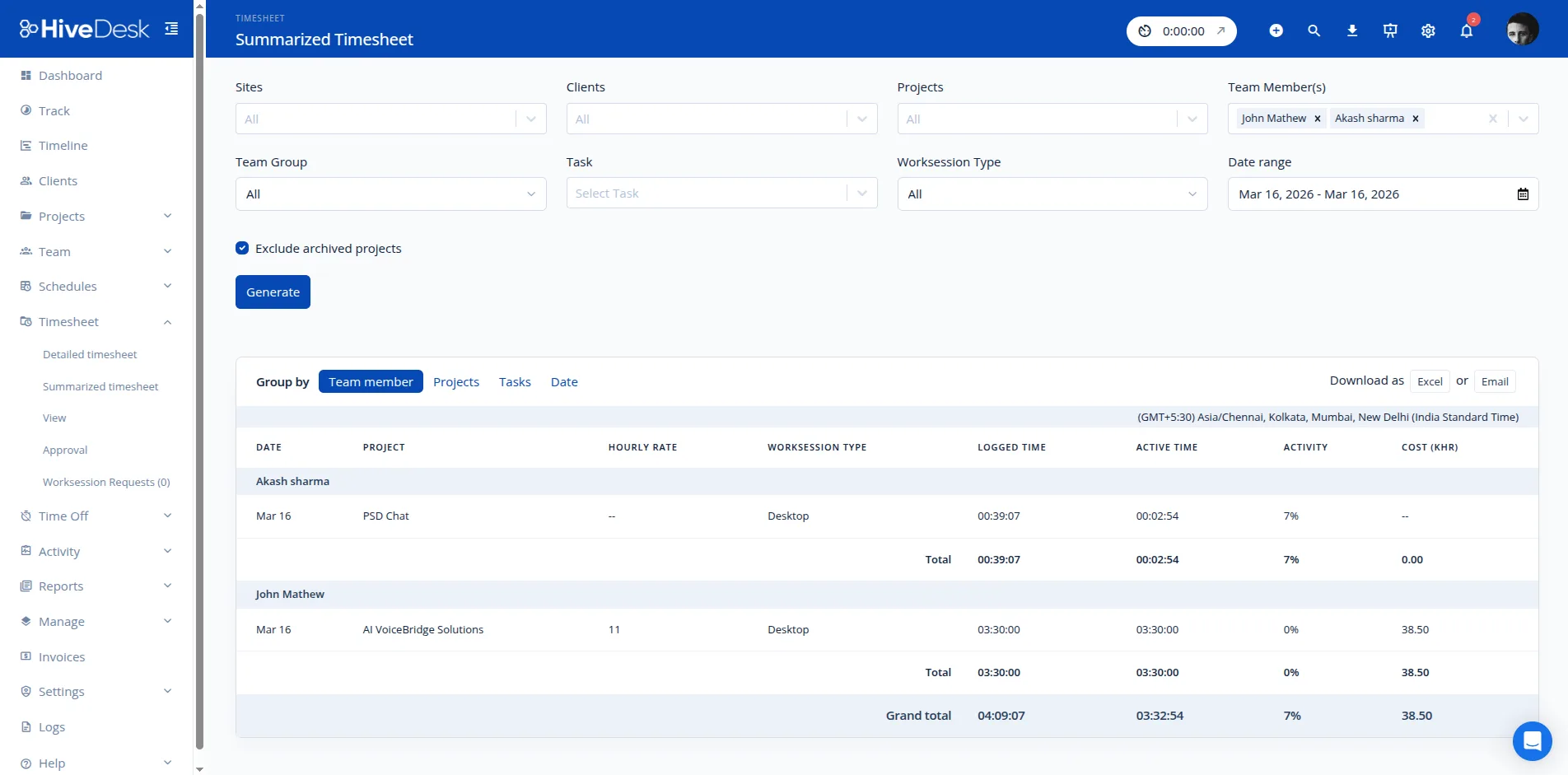
Staffing agencies need accurate data for two purposes: paying contractors and billing clients. HiveDesk combines time tracking with attendance, overtime, and leave records, then generates timesheets that flow through an approval workflow and export to Excel for payroll and invoicing.
- Auto-generated timesheets with manager approval workflow
- Overtime hours tracked and calculated automatically
- Separate exports for payroll (by contractor) and billing (by client)
- Attendance and time-off data included in every export
- Eliminate manual hour reconciliation and calculation errors
Built for Every Role at Your Staffing Agency
From coordinators scheduling placements to contractors tracking hours, HiveDesk gives every team member the tools they need.
Staffing Coordinators
Schedule contractors across client sites, monitor attendance and shift adherence, and reassign workers when coverage gaps arise.
- Shift scheduling by client site
- Real-time attendance monitoring
- Coverage gap alerts
Account Managers
Generate per-client timesheets and screenshot reports for invoicing. Resolve billing disputes with timestamped proof of work.
- Per-client timesheet exports
- PDF screenshot reports
- Billing dispute resolution
Contractors & Temp Workers
One-click time tracking across assignments. Switch between client projects seamlessly. Always know your hours are recorded accurately.
- One-button time tracking
- Multi-project switching
- Desktop, mobile, and browser apps
Payroll & Finance
Export approved timesheets with overtime, attendance, and leave data already calculated. Eliminate manual hour reconciliation.
- Auto-generated timesheets
- Overtime auto-calculation
- Excel export for payroll
Everything Your Staffing Agency Needs
One plan. $5/user/month. Every feature included.
Automatic Time Tracking
Contractors click one button to start tracking. Hours are recorded by client project automatically across desktop, mobile, and browser.
Contractor Scheduling
Create and assign shifts across client sites. Contractors see their schedules. Track adherence in real time.
Screenshot Monitoring
Periodic screenshots serve as proof of work for client billing. Share PDF screenshot reports to resolve disputes.
Timesheets & Approval
Auto-generated timesheets with manager approval workflow. Export per-client timesheets for invoicing and payroll.
Attendance & Leave
Track contractor attendance automatically. Manage time-off requests, approvals, and availability across placements.
Real-Time Dashboards
See which contractors are working, for which clients, and for how long. Drill into projects and individual contributors.
Trusted by Staffing Teams Since 2011
We have used every time tracking software under the sun, and they all fall short in some area that we need, but overall HiveDesk has met our needs. Their PDF screenshot reports are clean, easy to use and understand. Our clients prefer them over the complicated reports of other systems.
HiveDesk has been instrumental in helping us manage our remote team effectively. The automatic time tracking and screenshot features give us the visibility we need without micromanaging. Setup was straightforward and our team adopted it within a day.
Simple, Transparent Pricing
One plan with every feature included. No per-client fees, no hidden costs.
All features included
- Automatic time tracking across client sites
- Screenshot monitoring as proof of work
- Per-client timesheet generation
- Contractor scheduling & attendance
- Leave management
- Real-time dashboards & reporting
- Asana integration
No credit card required
Frequently Asked Questions
Everything staffing agencies need to know about HiveDesk.
HiveDesk gives each contractor a desktop, mobile, or browser app to track time. You create separate projects for each client placement, so hours are automatically allocated to the right client. Periodic screenshots provide proof of work, and timesheets are generated automatically for billing and payroll.
Yes. Each client site is set up as a separate project in HiveDesk. Contractors switch between projects as they move between assignments, and all hours are tracked per client. You can generate per-client timesheets and reports for invoicing.
HiveDesk takes periodic screenshots while contractors work. These screenshots serve as verifiable proof of work that you can share with clients as PDF reports. When a client questions hours billed, you have timestamped evidence showing exactly what the contractor was working on.
Yes. Since time is tracked by project (client), you can generate and export timesheets filtered by client. Export them as PDF or Excel for invoicing. Each timesheet shows hours worked, tasks completed, and activity levels.
HiveDesk supports distributed teams across time zones. You can schedule shifts, track attendance, and monitor hours regardless of where contractors are located. The real-time dashboard shows who is currently working across all time zones.
Yes. The HiveDesk dashboard gives staffing coordinators a real-time view of all active contractors, which clients they are working for, hours logged today, and activity levels. You can drill into individual contractors or filter by client project.
Yes. Remote contractors use the desktop or browser app. On-site and field contractors can use the iOS mobile app, which includes GPS location tracking. All data flows into the same dashboard regardless of where contractors work.
HiveDesk auto-generates timesheets from tracked time data. Managers review and approve timesheets, then export them as Excel for payroll processing. Overtime, attendance, and time-off data are all included, eliminating manual calculations.
HiveDesk costs $5 per user per month with all features included. There are no tiers, no per-feature upsells, and no hidden fees. You get time tracking, screenshots, scheduling, attendance, leave management, and reporting. There is a free 14-day trial with no credit card required.
Most agencies are up and running within a day. Sign up for a free trial, create projects for each client, invite your contractors, and they can start tracking time immediately. No IT department or lengthy onboarding required.
Related Resources
Guides
Templates
Ready to Get Started?
Join teams worldwide who trust HiveDesk for workforce management, time tracking, and employee monitoring. $5/user/month, all features included.