

Stop Chasing Employees for Timesheets
HiveDesk generates accurate timesheets automatically from tracked hours — then routes them through manager approval for payroll and client billing. No manual entries. No spreadsheets. No end-of-week scramble. All for $5/user/month.
No credit card required · Set up in under 10 minutes · Works on Windows, macOS, Linux, iOS, Chrome

Manual Timesheets Are Costing You Hours Every Week
Chasing employees for timesheets, fixing errors, reconciling spreadsheets, and calculating overtime by hand — it adds up to hours of wasted administrative time every pay period.
Without timesheet software
- Employees submit timesheets late or forget entirely
- Managers spend hours chasing people every pay period
- Manual data entry leads to payroll errors and overpayments
- Spreadsheet timesheets break, get lost, or have formula errors
- No way to verify hours for client billing disputes
- Compliance risk from inaccurate or incomplete records
With HiveDesk
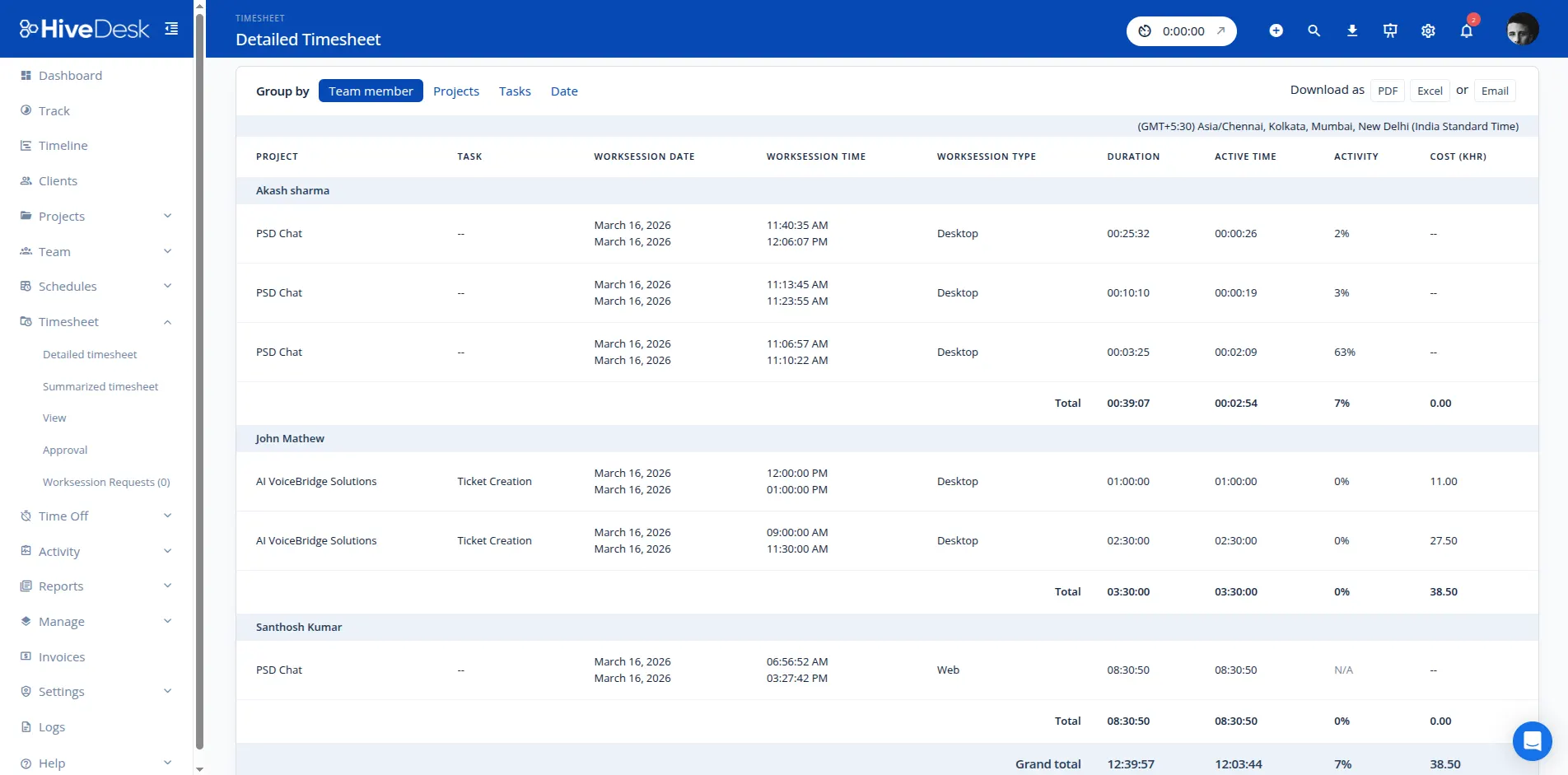
- Timesheets are generated automatically from tracked hours
- Managers review and approve timesheets in one workflow
- Export approved timesheets to Excel in one click for payroll
- Screenshot reports give clients verifiable proof of work
- Overtime, attendance, and leave records are always current
- Audit-ready records that satisfy federal and state labor laws
From Zero to Automated Timesheets in Minutes
No complex onboarding. No training sessions. No IT department required.
Create your account
Sign up for a free trial. Add your projects, tasks, and team members.
Employees track time
Team members start the timer on desktop, mobile, or browser. Hours are recorded by task and project.
Timesheets are generated
HiveDesk automatically creates timesheets from tracked hours. Overtime, breaks, and attendance are included.
Review, approve, export
Managers approve timesheets in one workflow. Export to Excel for payroll or PDF for client billing.
Labor Law Compliance
Timesheets that keep you audit-ready
The FLSA requires employers to keep accurate records of hours worked. State laws add overtime rules, break requirements, and record retention mandates. HiveDesk captures it all automatically — so your timesheet records are always complete and compliant.
- Accurate daily and weekly hour records for every employee
- Overtime hours tracked and documented in timesheets
- Break time monitoring for contact centers and shift workers
- Attendance and time-off records maintained continuously
- Export timesheet data for any audit or compliance review

Timesheet Approval
Review and approve timesheets before they hit payroll
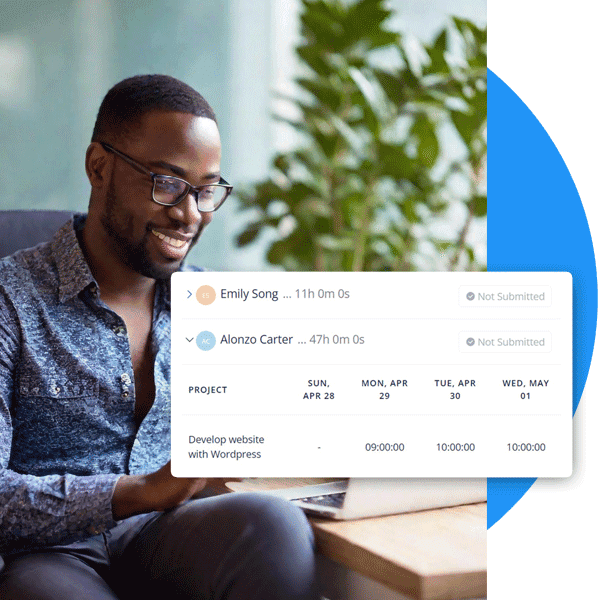
Automated timesheets are only useful if you can trust the data. The built-in approval workflow gives managers a checkpoint before timesheet data is used for payroll or client billing. Review hours, edit entries if needed, and approve with confidence.
- Manager review and approval before payroll processing
- Edit individual time entries when corrections are needed
- Combine time-off and attendance data with timesheet hours
- Export only approved timesheets as Excel or PDF
Client Billing
Bill clients with verified timesheets, not estimates
When you bill by the hour, inaccurate timesheets lead to billing disputes and delayed payments. HiveDesk records every billable hour with screenshot proof, so your invoices are backed by data clients can trust.
- Track billable and non-billable hours by client and project
- Share screenshot reports as proof of work completed
- Eliminate revenue leakage from untracked or forgotten hours
- Generate client-ready timesheet reports in one click

HiveDesk vs. Other Timesheet Software
Most timesheet tools are just timers with a report. HiveDesk gives you workforce management — scheduling, attendance, leave, and activity monitoring — all included at $5/user/month.
| HiveDesk | Harvest | QuickBooks Time | Clockify | |
|---|---|---|---|---|
| Automatic timesheet generation | Yes — from tracked hours | Manual entries | Yes | Yes |
| Timesheet approval workflow | Yes — manager review & approve | Yes | Yes | Yes (paid) |
| Screenshot monitoring | Yes — configurable frequency | No | No | No |
| Employee scheduling | Yes — shift creation & adherence | No | Yes | No |
| Attendance management | Yes — automatic from clock-in | No | Yes | No |
| Leave/time-off management | Yes — requests & approvals | No | Yes | Yes (paid) |
| Task & project tracking | Yes — with time by task | Yes | Limited | Yes |
| Export to Excel/PDF | Yes — one-click export | Yes | Yes | Yes (paid) |
| GPS location tracking | Yes — iOS mobile app | No | Yes | Yes (paid) |
| Price (per user/month) | $5 — all features | $11 | $6 + $20 base | $3.99–$11.99 |
More Than Just Timesheet Management Software
One plan. $5/user/month. Every feature included.
Automatic Time Tracking
One-click timer on desktop, mobile, and browser. Time is recorded by task, project, and client — no manual entries.
Timesheet Approval
Built-in approval workflow. Managers review, edit, and approve timesheets before payroll or billing.
Employee Scheduling
Create and assign shifts. Track schedule adherence in real time. Employees see their schedules.
Activity Monitoring
Periodic screenshots and activity levels for visibility without micromanaging. Employees always know when tracking is active.
Attendance & Leave
Track attendance from clock-in data. Manage time-off requests, approvals, and balances.
Real-Time Dashboards
See who is working, on what, and for how long. Drill into projects, tasks, and individual contributors.
Trusted by Teams Across 6 Continents Since 2011
Teams across 6 continents use HiveDesk to automate timesheets, track time, and manage their workforce.
We have used every time tracking software under the sun, and they all fall short in some area that we need, but overall HiveDesk has met our needs. Their PDF screenshot reports are clean, easy to use and understand. Our clients prefer them over the complicated reports of other systems.
We tried a lot of the competitors and for many reasons HiveDesk won. Plus, the team loves their support. Fast and attentive. We love HiveDesk. It allows us to track people's use and find areas of weakness. Their price level is perfect for us, and we love their reporting.
Frequently Asked Questions
Everything you need to know about timesheet management software.
Timesheet software is a tool that automatically records employee working hours and organizes them into timesheets for payroll processing, client billing, and labor law compliance. Unlike paper timesheets or spreadsheets, timesheet software like HiveDesk captures time data automatically — eliminating manual entry, reducing errors, and saving hours of administrative work every pay period.
Employees start the HiveDesk timer using the desktop app (Windows, macOS, Linux), mobile app (iOS), or Chrome browser extension. The software records hours by task and project, takes periodic screenshots for activity verification, and automatically generates timesheets. Managers review and approve timesheets through a built-in workflow, then export approved data as Excel or PDF for payroll or client invoicing.
HiveDesk costs $5 per user per month — one plan that includes every feature. No tiers, no hidden fees, no per-feature upsells. You get automated timesheets, approval workflows, time tracking, screenshots, scheduling, attendance, leave management, task tracking, and reporting. There is a free 14-day trial with no credit card required.
HiveDesk is a complete workforce management platform, not just a timesheet tool. You get automated timesheets with approval workflows, employee scheduling, attendance and leave management, activity monitoring with screenshots, and real-time dashboards — all for $5/user/month. Harvest charges $11/user. QuickBooks Time starts at $6/user plus a $20 base fee. Clockify charges $3.99-$11.99/user for comparable features.
Yes. HiveDesk includes a built-in timesheet approval workflow where managers review employee timesheets before they are used for payroll or billing. Managers can edit time entries if needed, approve or reject timesheets, and export only approved timesheets for processing. This ensures data integrity and accountability.
Approved timesheets can be exported as Excel (CSV) or PDF files. The Excel export works with any payroll software — simply import the data for processing. PDF exports are useful for client-facing reports and audit documentation.
Yes. HiveDesk is designed for remote, hybrid, and in-office teams. Remote employees track time using the desktop or mobile app from anywhere. The iOS app includes GPS location tracking for field workers. All data flows into the same dashboard and timesheets regardless of where employees work.
The Fair Labor Standards Act (FLSA) requires employers to keep accurate records of hours worked. Many states have additional overtime, break, and record-keeping requirements. HiveDesk automatically tracks work hours, overtime, breaks, attendance, and time-off — creating an audit-ready record that satisfies federal and state labor law requirements.
Any business that pays hourly employees or bills clients by the hour benefits from automated timesheets. Common industries include contact centers, BPO operations, marketing agencies, consulting firms, law firms, accounting practices, IT support teams, staffing agencies, architecture firms, and e-commerce customer support operations.
Yes. HiveDesk tracks billable hours by client and project. Approved timesheets provide an accurate record of work completed, and screenshot reports give clients verifiable proof. You can export timesheet data to generate invoices, reducing billing disputes and improving cash flow.
HiveDesk integrates with Asana for project and task management — you can track time directly inside Asana tasks, and the data flows into your HiveDesk timesheets automatically. Timesheet data exports to Excel and PDF for use with any payroll or accounting software.
Yes. HiveDesk offers a 14-day free trial with full access to every feature. No credit card required. You can add your team, track time, generate timesheets, test the approval workflow, and evaluate every feature before deciding.
Related Resources
Guides
Templates
Ready to Get Started?
Join teams worldwide who trust HiveDesk for workforce management, time tracking, and employee monitoring. $5/user/month, all features included.