

Attendance That Tracks Itself — No Punch Clocks, No Spreadsheets
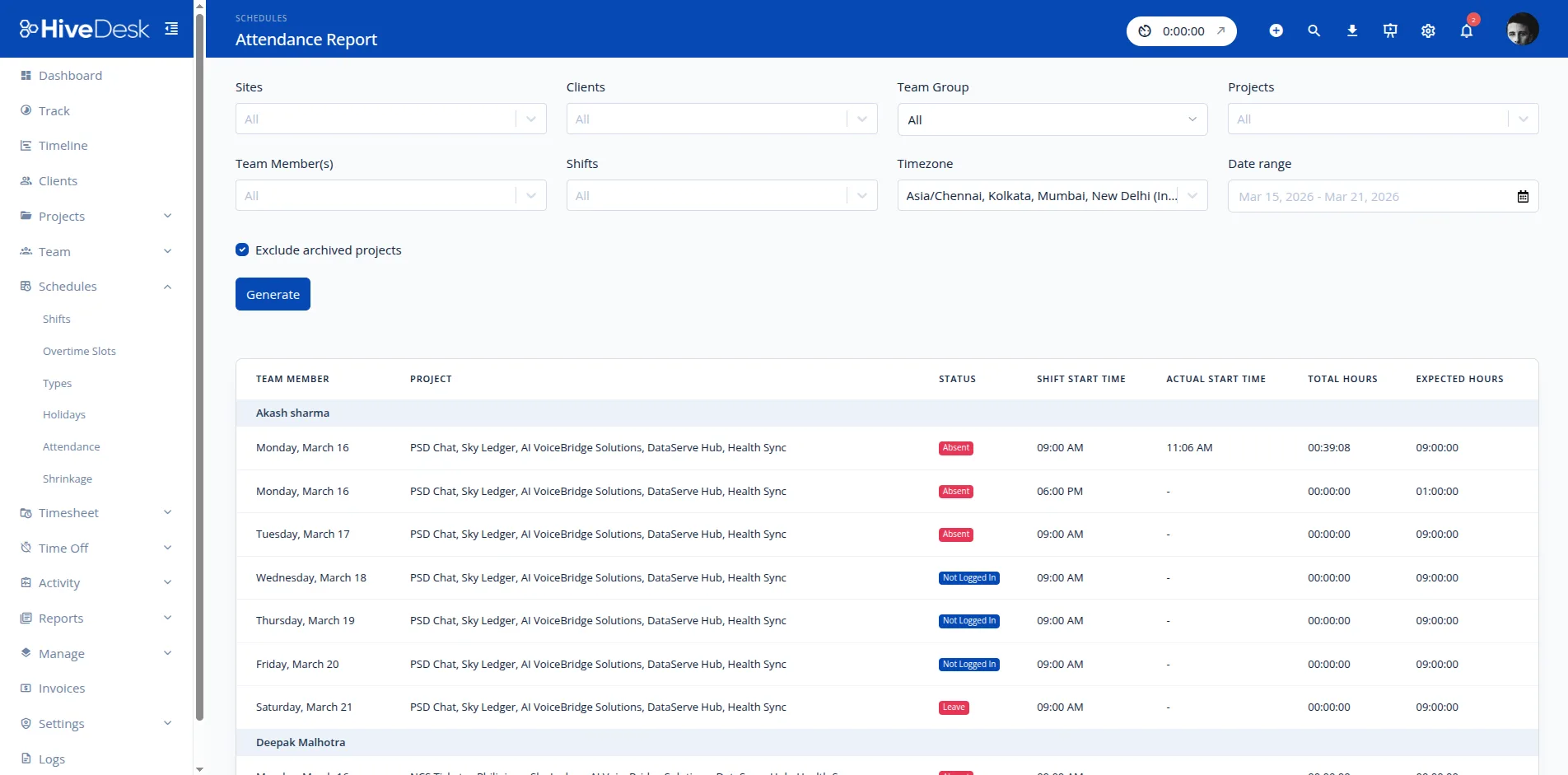
Your employees clock in with one click. HiveDesk records attendance automatically — tracking hours worked, absences, overtime, time off, and schedule adherence. No manual data entry. No paper trails. All for $5/user/month.
No credit card required · Set up in under 10 minutes · Works on Windows, macOS, Linux, iOS, Chrome
Manual Attendance Tracking Is a Time Sink
Spreadsheets get lost. Punch clocks break. Paper sign-in sheets are easy to fake. And managers waste hours every week reconciling attendance data for payroll. There is a better way.
Without an attendance tracker
- Employees forget to sign in or fill out attendance sheets late
- Managers spend hours reconciling attendance for payroll
- No way to verify who actually worked and for how long
- Overtime and absences slip through the cracks
- Leave balances tracked in spreadsheets that nobody trusts
- Compliance risk from inaccurate or missing records
With HiveDesk attendance tracking
- Attendance captured automatically from clock-in and clock-out times
- Timesheets generated and ready for manager approval
- Real-time dashboards show who is present, absent, or late
- Overtime hours tracked and flagged automatically
- Leave requests, approvals, and balances in one place
- Audit-ready records for labor law compliance
Up and Running in Under 10 Minutes
No complex onboarding. No training sessions. No IT department required.
Create your account
Sign up for a free trial. Add your projects, tasks, and team members.
Employees install the app
Desktop, mobile, or browser — employees choose their preferred device and start the timer.
Attendance is tracked automatically
Clock-in times, hours worked, absences, and overtime are all recorded without manual entry.
Review and export
Approve timesheets, review attendance reports, and export data for payroll.
Labor Law Compliance
Attendance records that hold up in an audit
The FLSA requires employers to maintain accurate records of hours worked. State laws add overtime rules, break requirements, and record retention mandates. HiveDesk captures attendance data automatically — so your records are always complete and audit-ready.
- Accurate daily and weekly attendance records for every employee
- Overtime hours tracked and flagged automatically
- Break time and shift adherence monitoring for contact centers
- Time-off records maintained continuously with approval trails
- Data exports for any audit or compliance review

Leave Management
Time off that manages itself
Managing employee time off involves leave policies, request workflows, and balance tracking. HiveDesk handles it all. Set up which leaves each employee is eligible for, let your team request time off through the platform, and approve requests in a few clicks.
- Set up transparent leave policies by employee or team
- Configure leave eligibility and annual balances
- Streamline time-off request and approval workflow
- Approved leave automatically reflected in attendance reports

Payroll Processing
From attendance data to payroll in minutes
Stop manually calculating hours, overtime, and time-off balances. HiveDesk combines attendance data with leave records, generates timesheets, runs them through a manager approval workflow, and exports clean data for your payroll software.
- Auto-generated timesheets with built-in approval workflow
- Overtime, attendance, and time-off data in one place
- Export approved timesheets as Excel for any payroll software
- Eliminate manual calculations and payroll errors

More Than Just an Attendance Tracker
One plan. $5/user/month. Attendance tracking, time tracking, scheduling, leave management, screenshots, timesheets, and reporting — all included.
Automatic Time Tracking
One-click timer on desktop, mobile, and browser. Time is recorded by task, project, and client — no manual entries.
Employee Scheduling
Create and assign shifts. Employees see their schedules. Track adherence in real time.
Activity Monitoring
Periodic screenshots and activity levels give you visibility without micromanaging.
Timesheets & Approval
Auto-generated timesheets with a manager approval workflow. Export to PDF or Excel for payroll.
Leave Management
Manage time-off requests, approvals, and balances. Set up leave policies by employee.
Real-Time Dashboards
See who is working, on what, and for how long. Drill into projects, tasks, and individual contributors.
Trusted by Teams Worldwide Since 2011
We have used every time tracking software under the sun, and they all fall short in some area that we need, but overall HiveDesk has met our needs. Their PDF screenshot reports are clean, easy to use and understand. Our clients prefer them over the complicated reports of other systems.
HiveDesk has been instrumental in helping us manage our remote team effectively. The automatic time tracking and screenshot features give us the visibility we need without micromanaging. Setup was straightforward and our team adopted it within a day.
What Is Attendance Tracking Software
Attendance tracking software records when employees start and stop working, monitors absences and tardiness, and maintains the attendance records businesses need for payroll and compliance.
Traditional attendance tracking relied on physical punch clocks, paper sign-in sheets, or manual spreadsheets. These methods are error-prone, easy to manipulate, and create significant administrative overhead. Modern attendance tracking software automates the entire process: employees clock in and out using a desktop app, mobile app, or browser, and the system records their hours, calculates totals, and flags any discrepancies.
Core capabilities of attendance tracking software include clock-in and clock-out recording with timestamps, absence and tardiness tracking with automatic alerts, leave management with request and approval workflows, schedule adherence monitoring that compares actual attendance against planned shifts, and compliance documentation that maintains the records required by federal and state labor laws including the FLSA.
For remote and hybrid teams, attendance tracking is especially important because managers cannot physically observe who is at their desk. Software like HiveDesk captures attendance data automatically from time tracking activity, so there is no need for separate check-in processes. When an employee starts the timer, their attendance is recorded. When they stop, their clock-out time is logged. This data flows into timesheets, attendance reports, and payroll exports without any manual entry.
How to Choose an Attendance Tracker
The right attendance tracker depends on your team structure, work model, and how tightly you need attendance integrated with payroll and scheduling.
Check-in methods. Consider how your employees will record attendance. Remote teams need desktop and mobile apps. On-site teams may want kiosk mode or badge integration. Field workers need mobile apps with GPS. HiveDesk supports desktop apps for Windows, macOS, and Linux, iOS mobile with GPS, and a Chrome browser extension.
Leave management. Look for built-in leave request and approval workflows. The best attendance trackers let employees submit time-off requests, managers approve or deny them, and the system automatically deducts from leave balances and reflects absences in attendance reports.
Payroll integration. Attendance data needs to flow into payroll. Some tools connect directly to payroll systems via API. Others, like HiveDesk, generate approved timesheets that can be exported as Excel or CSV for import into any payroll software. Either approach works — the key is eliminating manual data entry.
Compliance features. If you operate across multiple states or countries, you need an attendance tracker that maintains the records required for compliance. Look for automatic overtime calculation, break time tracking, and exportable audit trails. These features are critical for FLSA compliance and state labor law requirements.
Reporting and analytics. Evaluate the reporting capabilities. Can you easily see attendance patterns, identify employees with frequent tardiness or absences, and generate reports for specific date ranges? Good attendance data helps you spot problems early and make informed staffing decisions.
Guides and Resources
In-depth guides on attendance tracking, compliance, and team management.
- Attendance Tracking Without Micromanagement
How to maintain accountability and track attendance without creating a surveillance culture.
- Contact Center Compliance: Labor Laws
Key labor law requirements including attendance records, overtime, breaks, and documentation.
- Shift Rotation Patterns: Complete Guide
Common shift rotation patterns and their impact on attendance and schedule adherence.
- How to Build a Remote Contact Center
Setting up attendance tracking and operations for distributed contact center teams.
Frequently Asked Questions
Everything you need to know about employee attendance tracking software.
An attendance tracker is software that records when employees start and stop working, tracks days worked, hours logged, absences, and time off. Unlike manual methods like spreadsheets or punch clocks, an attendance tracker like HiveDesk captures attendance data automatically from clock-in and clock-out times — no manual entry required.
Employees start the HiveDesk timer using the desktop app (Windows, macOS, Linux), mobile app (iOS), or Chrome browser extension. The software records their clock-in and clock-out times, calculates hours worked, tracks attendance against their schedule, and logs any absences or late arrivals. All data flows into a centralized attendance report that managers can review anytime.
Yes. HiveDesk works for remote, hybrid, and in-office teams. Remote employees track time via the desktop or mobile app. The iOS mobile app includes GPS location tracking for field workers. Attendance data is captured automatically regardless of where employees work, giving you the same visibility across all locations.
HiveDesk generates timesheets automatically from attendance data. Managers review and approve timesheets through a built-in workflow. Approved timesheets can be exported as PDF or Excel for use with any payroll software. Overtime hours, time-off balances, and attendance records are all included — eliminating manual payroll calculations.
HiveDesk includes a complete leave management system. You set up leave policies and eligibility by employee. Team members submit time-off requests through the platform, and managers approve or deny them in a few clicks. Approved leave is automatically reflected in attendance reports and timesheets.
Yes, employee attendance tracking is legal in the United States and most countries when employees are informed. The Fair Labor Standards Act (FLSA) requires employers to maintain accurate records of hours worked. HiveDesk operates transparently — employees always know when tracking is active, and all data collection is visible to them.
HiveDesk costs $5 per user per month — one plan that includes every feature. No tiers, no hidden fees, no per-feature upsells. You get attendance tracking, time tracking, screenshots, scheduling, leave management, task tracking, timesheets, and reporting. There is a free 14-day trial with no credit card required.
Most attendance trackers only record clock-in and clock-out times. HiveDesk combines attendance tracking with time tracking, activity monitoring, employee scheduling, leave management, screenshot capture, and timesheet approval — all in a single platform for $5/user/month. You get complete workforce management, not just an attendance log.
Yes. HiveDesk includes employee scheduling where you can create and assign shifts. The attendance tracker then monitors whether employees clock in and out according to their schedule, giving you real-time visibility into schedule adherence, late arrivals, and early departures.
Yes. HiveDesk offers a 14-day free trial with full access to every feature. No credit card required. You can add your team, track attendance, set up schedules and leave policies, and test every feature before deciding.
Related Resources
Guides
Templates
Ready to Get Started?
Join teams worldwide who trust HiveDesk for workforce management, time tracking, and employee monitoring. $5/user/month, all features included.