

Timesheets Generated Automatically. Approved in One Click.
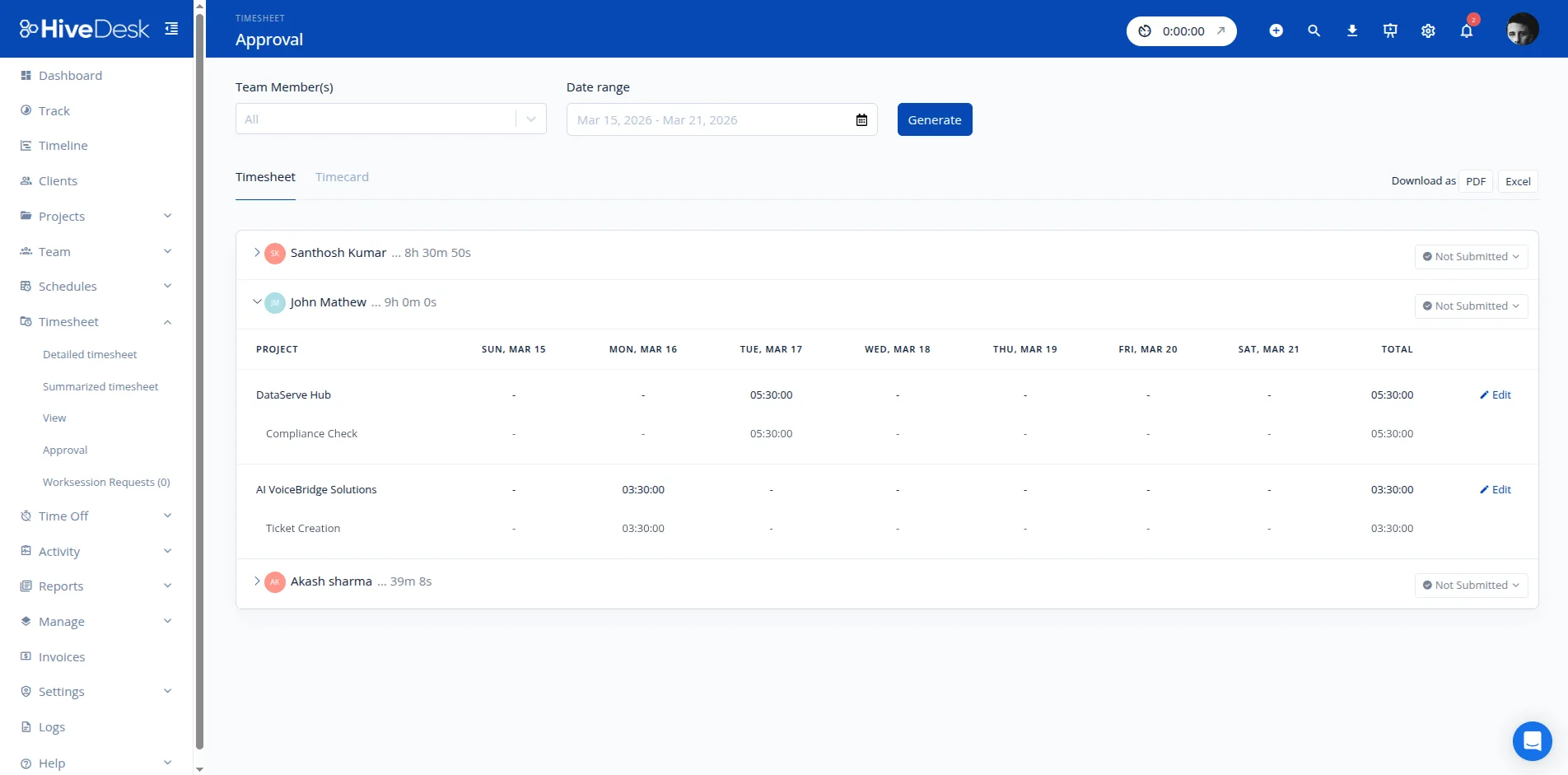
Stop chasing people for timesheets. HiveDesk generates them automatically from tracked hours, backs every entry with activity data, and lets managers approve with one click. Export for payroll in seconds.
No credit card required · $5/user/month · All features included
Manual Timesheets Are Inaccurate, Late, and Nobody Likes Them
Automate the entire process from time capture to payroll export.
Without automatic timesheets
- Employees fill in timesheets from memory days later — hours are rounded or guessed
- Managers spend hours chasing people for overdue timesheet submissions
- No activity context to verify whether reported hours are accurate
- Payroll is delayed because timesheets are not approved on time
With HiveDesk timesheets
- Timesheets are generated from actual tracked hours — no manual entry
- Managers review and approve from the dashboard in one click
- Screenshots and activity data back every hour for verification
- Export approved timesheets as PDF or Excel instantly for payroll
From Tracked Hours to Payroll-Ready Data
Automatic timesheets with everything managers and payroll teams need.
Auto-Generated Timesheets
Timesheets are created from actual tracked hours — no manual entry. As employees work, hours are recorded by project, task, and date. Timesheets are ready for review at the end of each period.
One-Click Approval
Managers review timesheets with activity data and screenshots for context. Approve in one click or request corrections. No back-and-forth emails — everything happens in the dashboard.
Project & Task Breakdown
See exactly how hours are distributed across projects and tasks. Add hourly rates to calculate labor costs per project or client. Know where time is going before invoicing.
Overtime in Timesheets
Daily and weekly overtime hours are tracked and included in timesheets automatically. Overtime is visible before payroll, not after — helping you manage costs proactively.
Activity-Backed Hours
Every timesheet hour is backed by activity data — keyboard/mouse levels and periodic screenshots. Managers have full context when reviewing, and clients get verifiable proof of work.
PDF & Excel Export
Export approved timesheets as PDF or Excel. Filter by date range, team, project, or individual. Clean data formatted for payroll processing or client invoicing.
How It Works
From time tracking to payroll-ready timesheets in three steps.
Track Time
Team members track time against projects and tasks using the desktop, mobile, or browser app. Hours are recorded automatically as they work.
Review & Approve
Managers review timesheets with activity data — hours, activity levels, and screenshots. Approve or request corrections from the dashboard.
Export for Payroll
Export approved timesheets as PDF or Excel. Filter by date range, team, project, or individual. Ready for payroll processing or client billing.
Frequently Asked Questions
Common questions about timesheet management in HiveDesk.
When team members track time using the HiveDesk desktop, mobile, or browser app, their hours are automatically compiled into timesheets. No manual time entry required — timesheets reflect actual tracked hours by project, task, and date.
Managers review timesheets from the dashboard, checking hours alongside activity data and screenshots. They can approve the timesheet or request corrections. Once approved, timesheets can be exported as PDF or Excel for payroll processing.
Yes. Export approved timesheets as PDF or Excel files. Reports include hours by employee, project, and date range — everything your payroll team needs. Overtime, attendance, and time-off data are included.
HiveDesk tracks daily and weekly hours so overtime is visible in timesheets before payroll. Overtime hours are clearly separated from regular hours, helping you manage costs and stay compliant with labor regulations.
Yes. Team members can view their tracked hours, daily and weekly summaries, and timesheet status from their dashboard. They always know their hours before the manager review step.
Team members select a project and task before tracking time. Timesheets show hours broken down by project and task, so you can see where time is going and calculate labor costs per client or project.
Yes. Every timesheet is backed by keyboard/mouse activity levels and periodic screenshots captured during work sessions. This gives managers context beyond raw hours when reviewing and approving timesheets.
Timesheets show hours per project and client. You can share screenshot reports as proof of work. This eliminates billing disputes and ensures you capture every billable hour for accurate invoicing.
HiveDesk integrates with Asana for project and task management. You can sync Asana projects with HiveDesk and track time against them. Timesheet data exports to Excel and PDF for any payroll software.
Immediately. Team members download the app and start tracking time. Timesheets are generated automatically from tracked hours — there is no setup required beyond creating your account and inviting your team.
Related Pages
Timesheet Software
Full product page for timesheet software — features, comparisons, and pricing details.
Time Tracking
Automatic time tracking across desktop, mobile, and browser — the data that powers your timesheets.
Free Timesheet Templates
Downloadable timesheet templates for Excel and Google Sheets while you evaluate software options.
Ready to Get Started?
Join teams worldwide who trust HiveDesk for workforce management, time tracking, and employee monitoring. $5/user/month, all features included.