

Track Labor Costs. Bill Clients Accurately. Protect Your Margins.
Labor is your biggest expense. When timesheets are inaccurate and billable hours go untracked, margins shrink. HiveDesk gives you verified time data by client, project, and agent — so you can bill with confidence and control costs with precision.
No credit card required · $5/user/month · All features included

You Cannot Control Costs You Cannot See
When time data is unreliable, every financial decision — from client billing to staffing levels — is based on incomplete information.
What finance managers struggle with
- Labor costs calculated from scheduled hours, not actual hours worked
- Billable hours under-reported because agents forget to log client time
- Client invoices disputed because there is no proof of work behind the numbers
- Overtime costs discovered after payroll runs — too late to manage
- No per-client or per-project profitability data to inform pricing decisions
- Payroll processing delayed by incomplete or inaccurate timesheets
How HiveDesk solves it
- Actual hours tracked automatically — labor cost calculations based on real data
- Every billable minute captured by client, project, and agent
- Screenshot reports provide verifiable proof of work for client billing
- Overtime flagged in real time so you can intervene before costs escalate
- Per-client and per-project time reports enable profitability analysis
- Timesheets auto-generated, approved, and exported for payroll in minutes
Billable Hours & Client Billing
Bill every hour you earned, with data to back it up
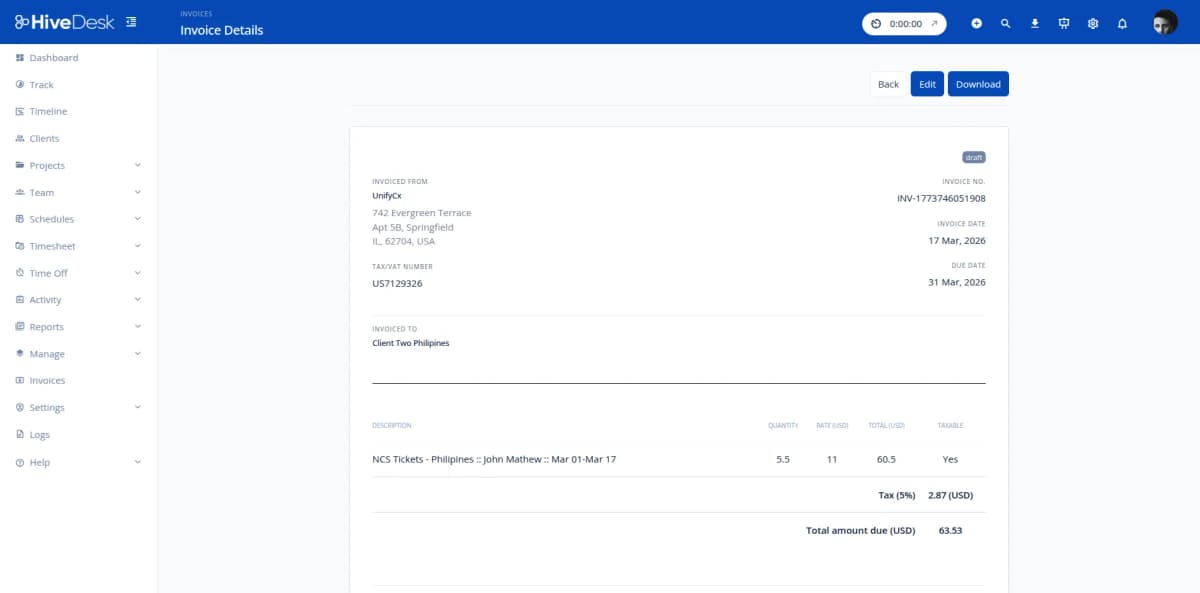
Set up projects for each client account. As agents work, HiveDesk tracks time against the correct client automatically. At billing time, pull per-client timesheets showing hours by agent and task. Attach screenshot reports as proof of work. No more under-billing because hours were not logged.
- Track billable hours by client, project, and agent automatically
- Separate billable from non-billable time for utilization analysis
- Per-client timesheets ready for invoicing — export as PDF or Excel
- Screenshot reports serve as verifiable proof of work
- Eliminate revenue leakage from untracked billable hours
Labor Cost & Overtime Control
See labor costs in real time, not after the damage is done
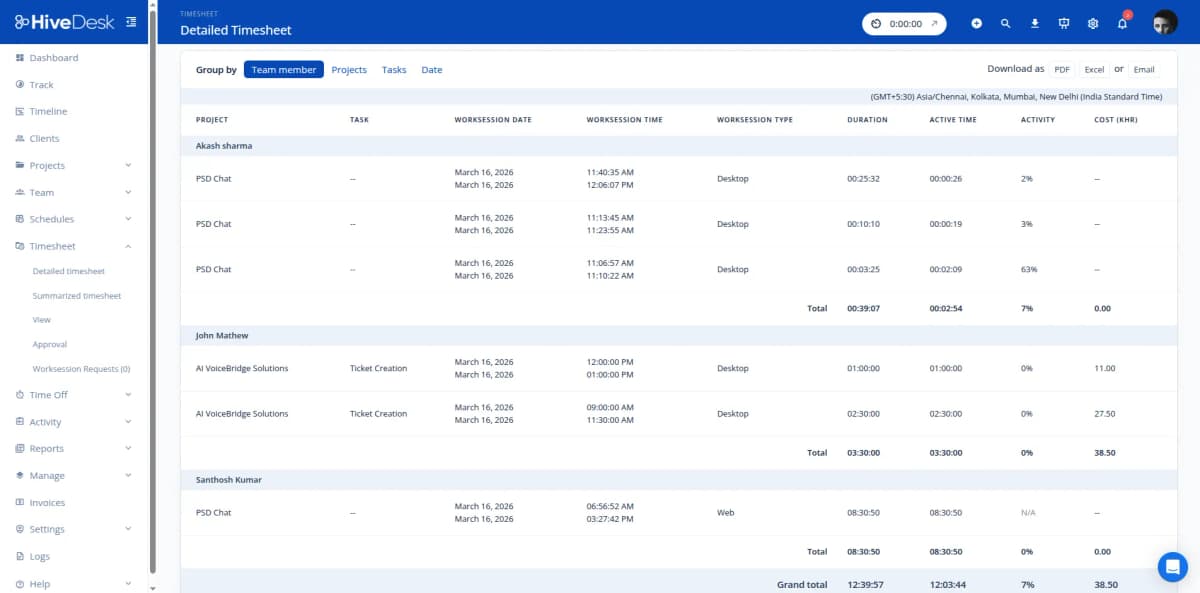
HiveDesk tracks actual hours worked per agent, per day, per week. Overtime is flagged as it accumulates — not after the pay period closes. You can pull reports showing total hours by team, department, or location to identify where labor costs are concentrated and where staffing adjustments would reduce spend.
- Actual hours worked — not scheduled hours — for accurate cost calculations
- Overtime flagged in real time before costs escalate
- Hours reports by team, department, or location for cost analysis
- Compare labor hours across pay periods to identify trends
- Timesheet approval prevents payroll errors before they happen
Payroll-Ready Timesheets
From tracked hours to payroll in minutes, not days
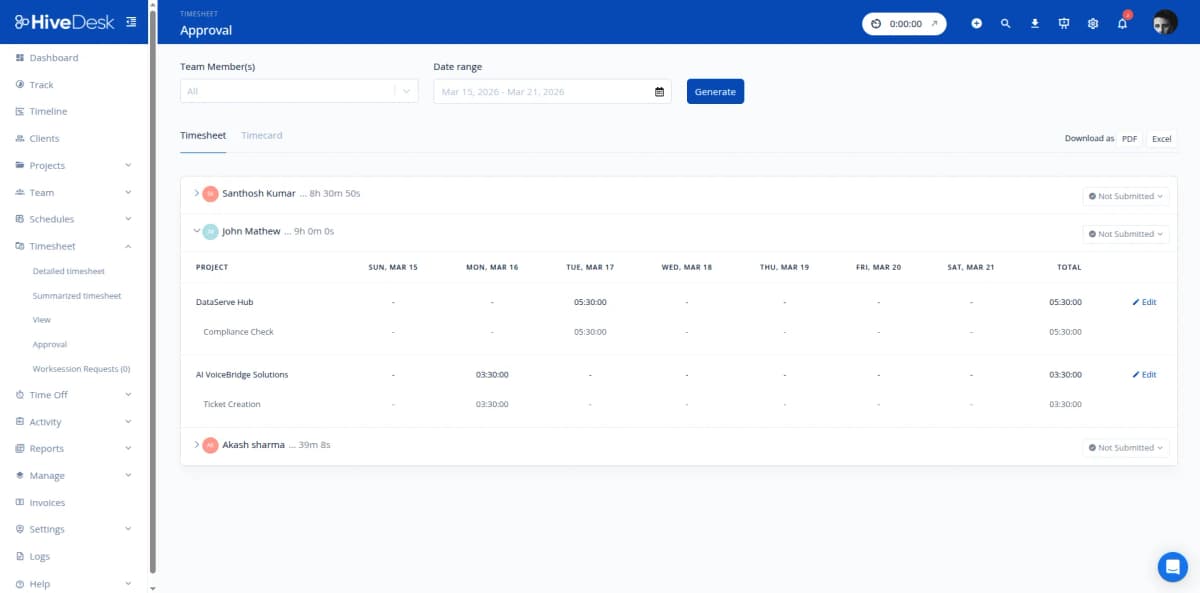
Stop chasing agents for timesheet submissions. HiveDesk auto-generates timesheets from tracked time. Managers review and approve through a built-in workflow. Export approved timesheets as Excel with regular hours, overtime, attendance, and leave data — everything your payroll system needs in one clean export.
- Auto-generated timesheets from actual tracked hours
- Manager review and approval workflow
- Export approved timesheets as Excel or PDF
- Regular hours, overtime, and attendance data included
- Reduce payroll processing from days to minutes
Complete Workforce Management. $5/User/Month.
One plan with every feature included. No tiers, no hidden fees, no per-feature upsells.
Automatic Time Tracking
Agents track hours on desktop, mobile, or browser. Every minute captured by client, project, and task — no manual entries or estimates.
Project & Task Tracking
Organize work by client and project. Track billable vs non-billable hours separately for accurate invoicing and utilization analysis.
Timesheets & Approval
Auto-generated timesheets with manager approval. Export per-client reports as PDF or Excel for invoicing and payroll.
Activity Monitoring
Periodic screenshots and activity levels verify agent work. Share screenshot reports with clients as proof of work alongside invoices.
Attendance & Leave
Track attendance from clock-in data. Manage leave balances and time-off requests. All data feeds into payroll-ready reports.
Real-Time Dashboards
See who is working on which client account in real time. Drill into hours by project, team, or individual for cost analysis.
Trusted by Teams Across 6 Continents Since 2011
We have used every time tracking software under the sun, and they all fall short in some area that we need, but overall HiveDesk has met our needs. Their PDF screenshot reports are clean, easy to use and understand. Our clients prefer them over the complicated reports of other systems.
Frequently Asked Questions
Common questions about HiveDesk for contact center finance managers.
HiveDesk tracks actual hours worked by every agent, organized by project, team, and client. You can pull reports showing total hours per agent, per team, or per project for any date range. Combined with your pay rates, this gives you accurate labor cost data — not estimates based on scheduled hours that may not reflect reality.
Yes. Set up projects for client-billable work and separate projects for internal tasks. HiveDesk tracks time against each project separately. At billing time, pull reports showing only billable hours by client — broken down by agent and task — so you can invoice with confidence.
HiveDesk generates per-client timesheets showing hours worked by each agent on client projects. Managers review and approve timesheets through a built-in workflow. Export approved timesheets as PDF or Excel — ready to attach to client invoices. Periodic screenshots provide proof of work if clients request it.
HiveDesk tracks hours per agent per day and per week. When agents exceed standard hours, overtime is flagged in timesheets and reports. You see overtime accumulating in real time rather than discovering it after the pay period closes — giving you the data to intervene before costs spike.
Yes. Pull time reports by client or project to see total hours invested. Compare billable hours against total hours to calculate utilization rates. When you combine HiveDesk time data with your revenue and cost figures, you can identify which clients and projects are profitable and which are eroding your margins.
HiveDesk auto-generates timesheets from tracked hours — no manual entry by agents. Managers review and approve timesheets through an approval workflow. Approved timesheets export as Excel with regular hours, overtime, and attendance data — ready for your payroll system.
HiveDesk provides timesheets, project time reports, overtime reports, attendance reports, and activity reports. Filter any report by date range, client, project, team, or individual agent. Export as PDF or Excel. All reports are generated from actual tracked hours, not estimates.
HiveDesk costs $5 per user per month — one plan with every feature included. No tiers, no setup fees, no per-feature upsells. You get time tracking, project tracking, timesheets, scheduling, attendance, leave management, activity monitoring, and reporting. There is a 14-day free trial with no credit card required.
Related Resources
Role-Specific Solutions
Contact Center Solutions
Ready to Get Started?
Join teams worldwide who trust HiveDesk for workforce management, time tracking, and employee monitoring. $5/user/month, all features included.