

Attendance, Leave, and Compliance — Handled Automatically
Managing HR for a contact center means tracking attendance across shifts, processing leave requests, monitoring overtime, and keeping records for compliance. HiveDesk automates the tedious parts so you can focus on your people.
No credit card required · $5/user/month · All features included

Contact Center HR Is Drowning in Manual Processes
With dozens or hundreds of agents across multiple shifts, tracking attendance and leave manually is unsustainable. One missed timecard or misapplied leave policy creates ripple effects across payroll, scheduling, and compliance.
What HR managers struggle with
- Attendance tracked on spreadsheets or paper sign-in sheets that are error-prone
- Leave balances calculated manually — mistakes lead to disputes and overpayments
- No centralized system for time-off requests and approvals
- Overtime hours discovered after the pay period closes, too late to manage costs
- Compliance documentation pieced together from multiple sources
- Payroll processing takes days because timesheet data is incomplete or inconsistent
How HiveDesk solves it
- Attendance recorded automatically from agent clock-in/out — no manual timecards
- Leave balances update in real time as requests are approved and time is taken
- Built-in request and approval workflow for all time-off types
- Overtime flagged as it happens so you can intervene before the pay period closes
- Hours, attendance, and leave data in exportable reports ready for audits
- Approved timesheets export to Excel in minutes — payroll-ready
Automated Attendance
Attendance data you can trust, without chasing timecards
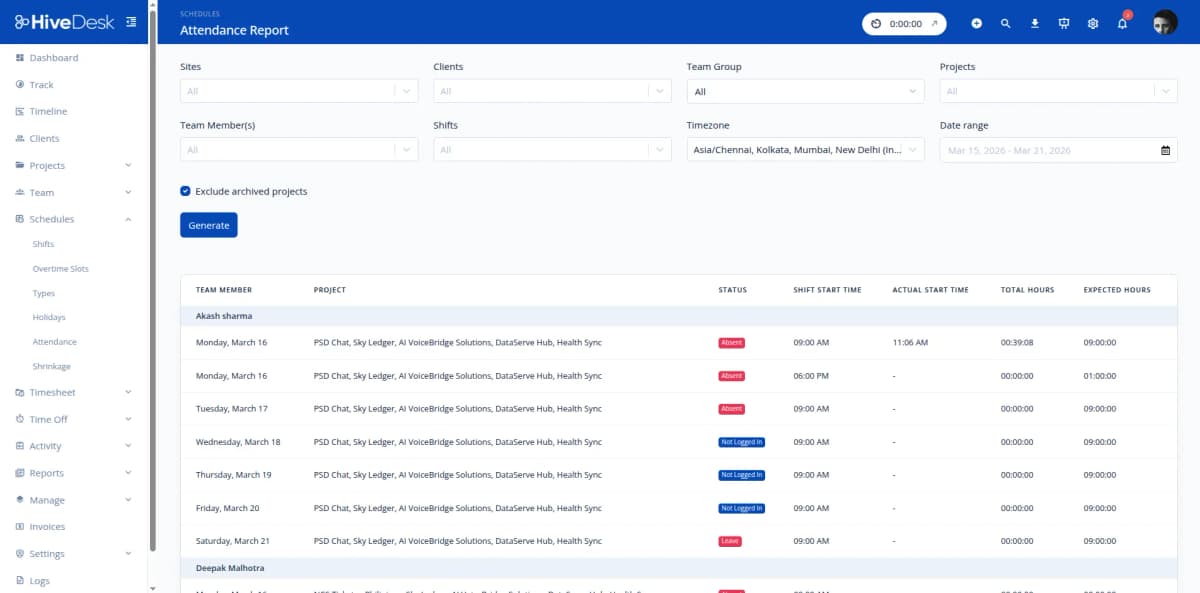
When agents start tracking time in HiveDesk, their clock-in is recorded. When they stop, their clock-out is recorded. The system compares these times against scheduled shifts and generates attendance reports automatically. Late arrivals, early departures, and no-shows are flagged — no spreadsheets, no manual entry, no disputes.
- Automatic clock-in/out from agent time tracking apps
- Compare actual attendance against scheduled shifts
- Flag late arrivals, early departures, and absences
- Attendance reports by agent, team, or date range
- Export attendance data for payroll and compliance records
Leave Management
Leave requests, approvals, and balances in one place
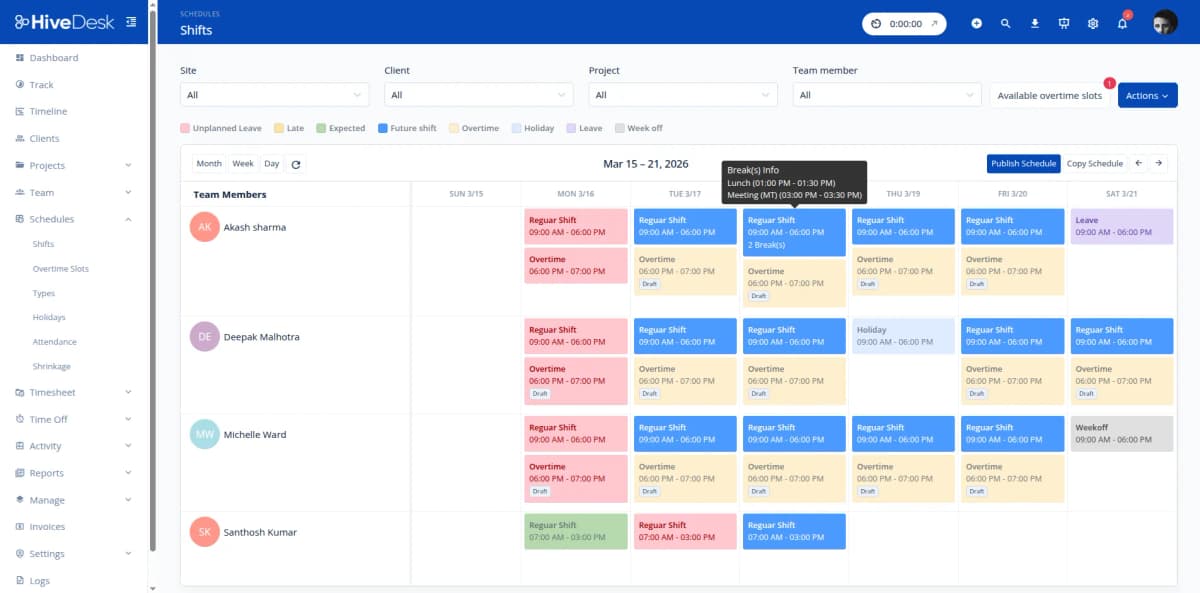
Configure leave policies for PTO, sick leave, personal days, and any other categories your contact center uses. Set annual balances per agent. When agents request time off, managers receive notifications and approve or decline through a built-in workflow. Balances update automatically, and approved leave shows on the schedule.
- Configurable leave policies with annual balance tracking
- Self-service time-off requests for agents
- Manager approval workflow with notifications
- Automatic balance deductions when leave is approved
- Approved leave reflected on team schedules
Compliance & Payroll
Clean records for compliance audits and payroll processing
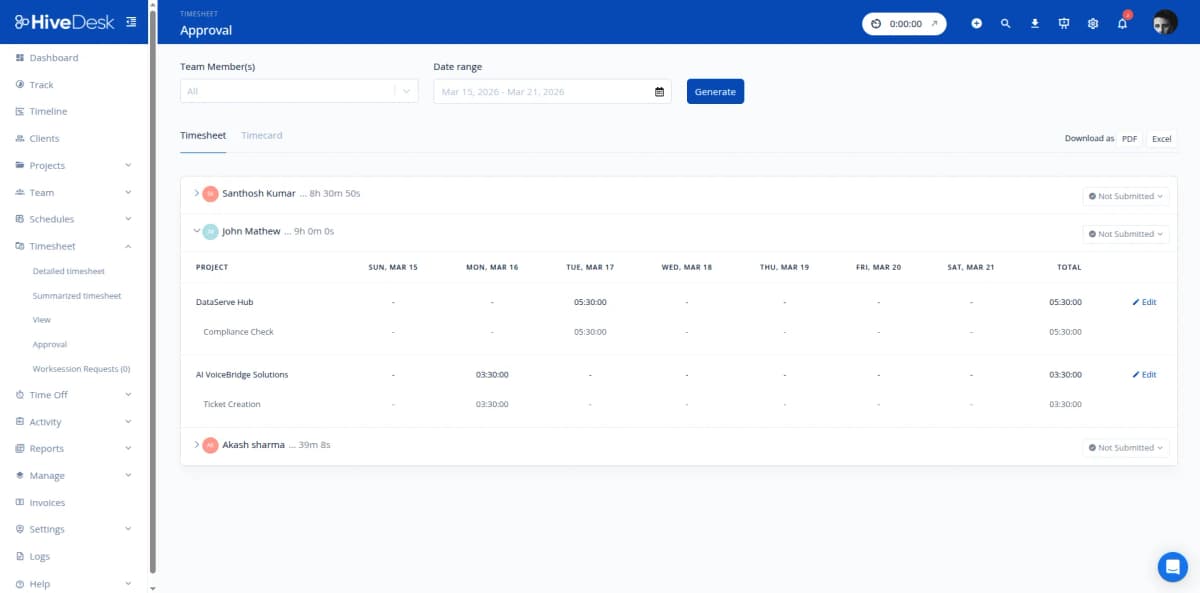
HiveDesk continuously records hours worked, overtime, attendance, and leave for every agent. When it is time for payroll, timesheets are already generated from tracked data — managers just review, approve, and export. For compliance audits, pull reports covering any date range with hours, overtime, and attendance records in exportable formats.
- Overtime flagged automatically when agents exceed standard hours
- Timesheet approval workflow before payroll processing
- Export approved timesheets as Excel or PDF
- Hours, overtime, and attendance records available for any date range
- Compliance guides for 45 countries and 25 US states at /compliance
Everything HR Needs. $5/User/Month.
One plan with every feature included. No tiers, no hidden fees, no per-feature upsells.
Attendance Tracking
Automated clock-in/out from agent time tracking. Compare actual attendance against scheduled shifts with detailed reports.
Leave Management
Configure leave policies, manage balances, and process time-off requests with a built-in approval workflow.
Automatic Time Tracking
Agents track hours on desktop, mobile, or browser. Timesheets generated from actual tracked time — no manual entry.
Shift Scheduling
Create and assign shifts with recurring schedule support. Track adherence and ensure proper staffing coverage.
Timesheets & Approval
Auto-generated timesheets with manager approval workflow. Export approved timesheets as Excel or PDF for payroll.
Reports & Export
Attendance, overtime, leave, and timesheet reports. Filter by date, team, or agent. Export for payroll and compliance.
Trusted by Teams Across 6 Continents Since 2011
We have used every time tracking software under the sun, and they all fall short in some area that we need, but overall HiveDesk has met our needs. Their PDF screenshot reports are clean, easy to use and understand. Our clients prefer them over the complicated reports of other systems.
Frequently Asked Questions
Common questions about HiveDesk for contact center HR managers.
When agents start the HiveDesk timer on their desktop, mobile, or browser app, their clock-in time is recorded automatically. Clock-out is recorded when they stop the timer. HiveDesk compares these times against their scheduled shifts and generates attendance reports showing on-time arrivals, late starts, early departures, and absences — no manual timecards or sign-in sheets required.
You configure leave policies (PTO, sick leave, personal days, etc.) with annual balances for each agent. Agents submit time-off requests through HiveDesk, and managers approve or decline them through a built-in workflow. Balances update automatically, and approved leave appears on the schedule so you always know who will be available.
HiveDesk tracks hours worked, breaks, and overtime for every agent. This data is available in exportable reports you can use to verify compliance with labor regulations. HiveDesk also maintains compliance guides for 45 countries and 25 US states at /compliance — covering overtime rules, break requirements, and recordkeeping obligations.
HiveDesk tracks total hours worked per agent per day and per week. When agents exceed standard hours, overtime is flagged in timesheets and reports. You can review overtime data before approving timesheets, giving you visibility into overtime costs and helping you stay compliant with overtime regulations.
Yes. HiveDesk auto-generates timesheets from tracked hours. Managers review and approve timesheets through an approval workflow. Approved timesheets can be exported as Excel or PDF with all the data payroll needs — regular hours, overtime, attendance, and leave taken.
Create any shift schedule your contact center uses — fixed shifts, rotating shifts, split shifts, or flexible hours. Assign agents to shifts and set up recurring schedules. HiveDesk tracks attendance against the schedule regardless of shift pattern, and supports agents working across different time zones.
Yes. Organize agents into teams by department, queue, or function. Each agent has a profile with their schedule, leave balances, tracked hours history, and attendance records. Filter any report by team or individual agent to get the data you need for HR decisions.
HiveDesk costs $5 per user per month — one plan that includes every feature. No tiers, no per-feature upsells, no hidden fees. You get time tracking, attendance, leave management, scheduling, activity monitoring, timesheets, and reporting. There is a 14-day free trial with no credit card required.
Related Resources
Role-Specific Solutions
Contact Center Solutions
Ready to Get Started?
Join teams worldwide who trust HiveDesk for workforce management, time tracking, and employee monitoring. $5/user/month, all features included.