

Staff the Right Agents at the Right Time. Track Every Support Hour.
Support teams run on schedules, shifts, and coverage. HiveDesk tracks agent hours automatically, manages shift scheduling across time zones, monitors attendance in real time, and generates the timesheets you need for payroll and client billing.
No credit card required · $5/user/month · All features included
Support Team Workforce Management Is Broken. Here's Why.
Most support teams rely on manual scheduling, spreadsheet-based attendance, and the honor system for agent hours. The result: coverage gaps, uncontrolled overtime, and no real visibility into how agents spend their shifts.
Without support team time tracking
- Agents clock in late or miss shifts with no real-time visibility
- Manual scheduling leads to understaffing during peak hours and overstaffing during lulls
- Overtime creeps up because no one tracks total hours in real time
- Remote agents work without accountability — managers guess at productivity
- BPO and outsourced teams submit unverifiable time records for billing
- No historical data to optimize future staffing and scheduling decisions
With HiveDesk
- Real-time attendance dashboard shows who is online, who clocked in late, and who is absent
- Shift scheduling ensures the right number of agents are staffed during every coverage window
- Overtime is tracked automatically — managers see hours accumulating before they hit thresholds
- Activity monitoring with screenshots provides accountability for remote agents
- Per-client time reports with proof of work for BPO and outsourced billing
- Historical attendance and time data improves future scheduling and staffing decisions
Shift Scheduling & Coverage
Schedule agents across shifts, time zones, and coverage windows
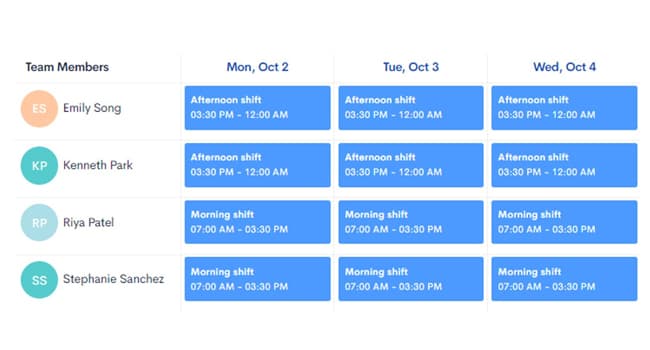
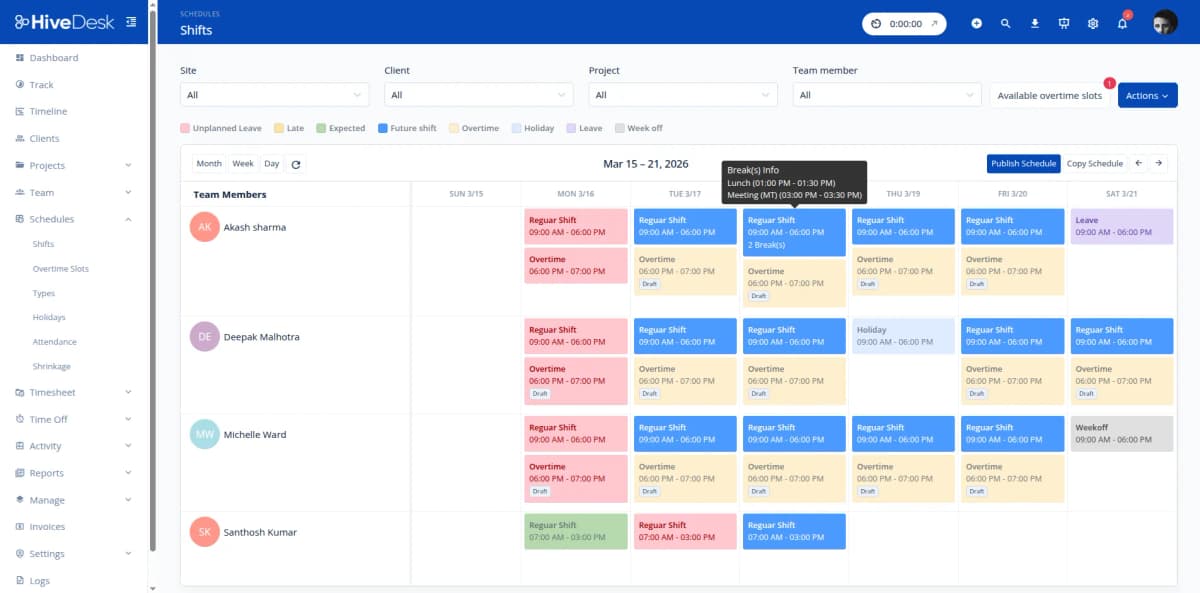
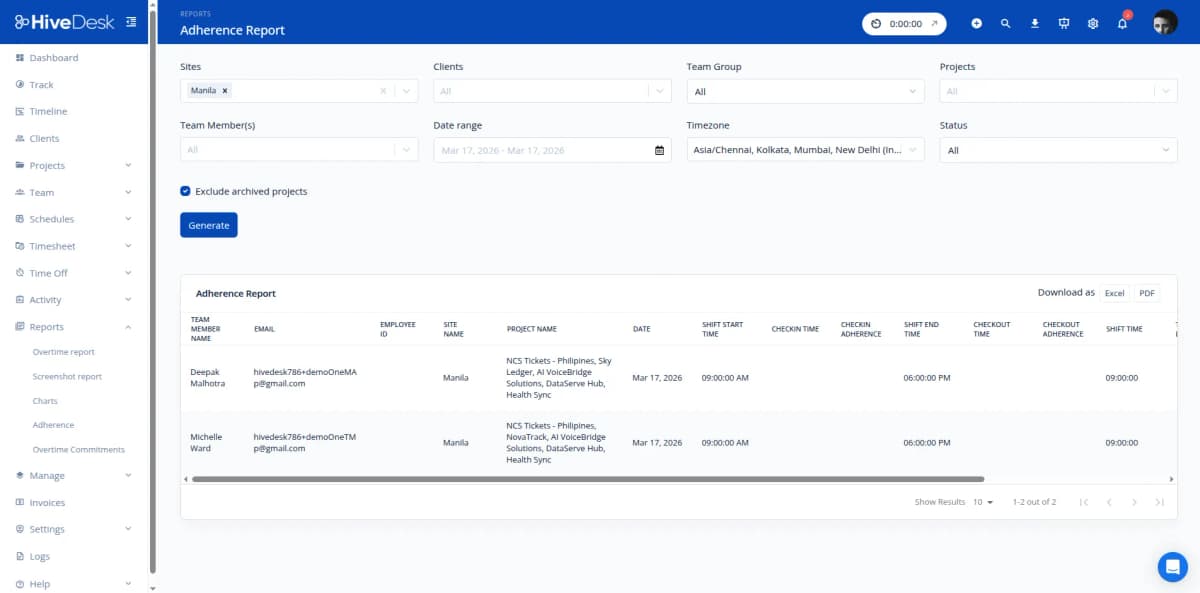
Support teams live and die by coverage. HiveDesk employee scheduling lets you create shifts for different service windows, assign agents, and track schedule adherence in real time. Whether you run a single-location team or a follow-the-sun model across time zones, you always know if you are staffed correctly.
- Create morning, afternoon, overnight, and weekend shifts
- Assign agents to shifts and track schedule adherence
- Multi-timezone scheduling for distributed support teams
- See real-time staffing levels against planned coverage
- Leave management ensures coverage around planned absences
Agent Monitoring & Attendance
Know who is online, who is working, and who missed their shift
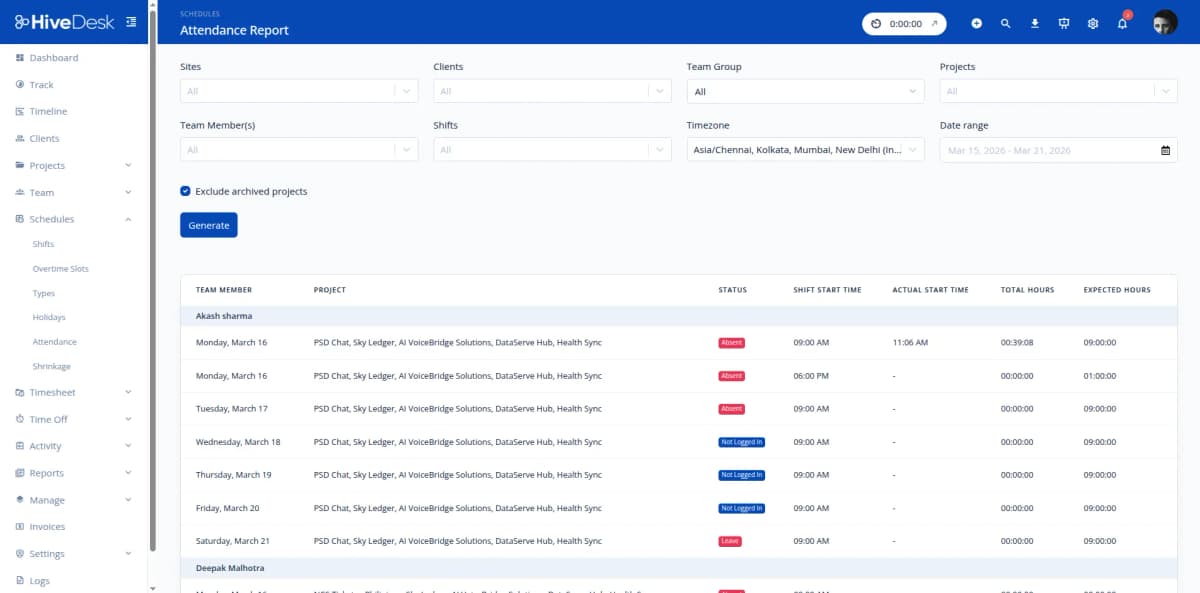
Support managers need real-time visibility into their team. HiveDesk dashboards show which agents are currently clocked in, how long they have been active, and what they are working on. Activity monitoring with periodic screenshots provides accountability for remote and work-from-home agents — without micromanaging.
- Real-time dashboard shows active agents and their current status
- Periodic screenshots for remote agent accountability
- Attendance tracking — see late arrivals and missed shifts instantly
- Activity levels help identify idle time during shifts
- Historical attendance reports reveal patterns and trends
Timesheets & Client Billing
Generate timesheets for payroll and per-client billing
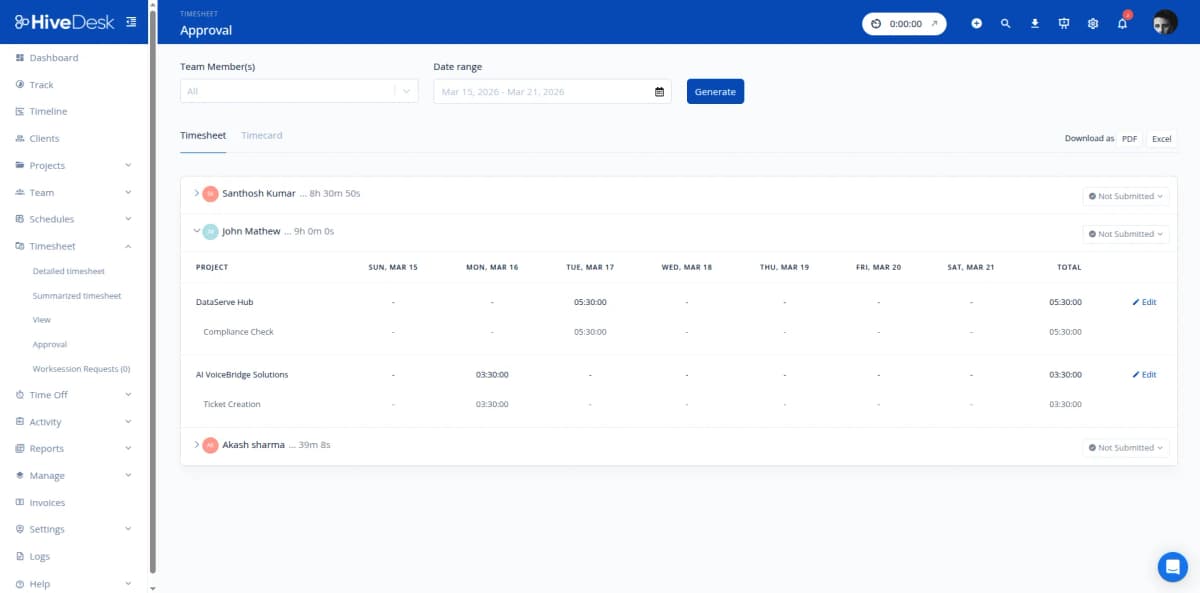
Whether you need timesheets for internal payroll or per-client billing reports for outsourced support contracts, HiveDesk auto-generates them from tracked time. Managers review and approve through a built-in workflow. Export as PDF or Excel — ready for payroll processing or client invoicing.
- Auto-generated timesheets from tracked agent hours
- Manager review and approval workflow
- Per-client reports for BPO and outsourced billing
- Screenshot reports as verifiable proof of work
- Export as PDF or Excel for payroll or invoicing
Overtime & Compliance
Control overtime and maintain compliance-ready records
Support operations face strict labor requirements around breaks, maximum hours, and overtime pay. HiveDesk tracks total hours, breaks, and overtime automatically. Managers see hours accumulating in real time and can adjust schedules before agents exceed thresholds. All time records are audit-ready for compliance reviews.
- Automatic overtime tracking and flagging
- Break time monitoring for labor law compliance
- Real-time hours view to prevent unplanned overtime
- Audit-ready time records for compliance reviews
- Historical data for labor cost analysis and forecasting
How Support Teams Use HiveDesk
From in-house support desks to outsourced BPO operations, HiveDesk adapts to how your support team works.
In-House Support Teams
Track agent hours across shifts, monitor attendance, and generate timesheets for payroll. Real-time dashboards show current staffing levels so managers can respond to unexpected absences or volume spikes.
- Track hours across morning, afternoon, and overnight shifts
- Monitor real-time staffing levels against schedule
- Generate payroll-ready timesheets with overtime tracking
Outsourced & BPO Support
BPO providers need accurate, per-client time records for billing. HiveDesk tracks agent hours by client project automatically and provides screenshot reports as proof of work — eliminating billing disputes and building client trust.
- Track billable hours per client contract
- Generate per-client invoicing reports with proof of work
- Verify outsourced agent activity with periodic screenshots
Remote Support Teams
Distributed support agents across different cities and time zones need the same level of accountability as in-office staff. HiveDesk provides real-time visibility into remote agent activity, attendance, and schedule adherence.
- Real-time dashboards for remote agent monitoring
- Schedule coverage across time zones
- Track attendance for work-from-home agents
Support Team Managers
Team leads and operations managers need data to optimize staffing, control overtime, and maintain service levels. HiveDesk provides the reporting foundation for workforce planning decisions.
- Identify understaffing patterns by shift and day of week
- Track overtime trends and control labor costs
- Use historical data to forecast staffing needs
Everything Your Support Team Needs. $5/User/Month.
One plan with every feature included. No tiers, no hidden fees, no per-feature upsells.
Automatic Time Tracking
One-click timer on desktop, mobile, and Chrome browser. Agent hours are recorded by shift, project, and queue — no manual timesheets.
Activity Monitoring
Periodic screenshots and activity levels give managers visibility into agent productivity during shifts without hovering over their shoulder.
Employee Scheduling
Create shifts, assign agents to coverage windows, and track schedule adherence. Works across multiple time zones for distributed support teams.
Timesheets & Approval
Auto-generated timesheets with manager approval workflow. Export per-client or per-shift reports as PDF or Excel for billing and payroll.
Attendance & Leave
Track agent attendance automatically from clock-in data. Manage PTO requests and approvals to plan coverage around absences.
Real-Time Dashboards
See which agents are currently online, how long they have been working, and who missed their shift. Drill into individual agent activity.
Trusted by Teams Across 6 Continents Since 2011
We have used every time tracking software under the sun, and they all fall short in some area that we need, but overall HiveDesk has met our needs. Their PDF screenshot reports are clean, easy to use and understand. Our clients prefer them over the complicated reports of other systems.
HiveDesk has been instrumental in helping us manage our remote team effectively. The automatic time tracking and screenshot features give us the visibility we need without micromanaging. Setup was straightforward and our team adopted it within a day.
Simple Pricing for Support Teams
One plan with all features included. Scale your team up or down as support volume changes.
All features included
- Automatic time tracking across all devices
- Activity monitoring with screenshots
- Employee scheduling
- Attendance & leave management
- Project & task tracking
- Timesheet generation & approval
- Reporting & analytics dashboards
- Asana integration
No credit card required
Frequently Asked Questions
Everything you need to know about time tracking for customer support teams.
HiveDesk automatically tracks time when agents clock in using the desktop app, Chrome extension, or mobile app. Time is recorded against their assigned shift, project, or queue. Managers see real-time attendance data — who clocked in, who is currently working, and who missed their shift — without relying on manual check-ins or spreadsheets.
Yes. HiveDesk employee scheduling lets you create shifts for different coverage windows and assign agents to those shifts. The system works across time zones, so you can schedule a follow-the-sun support model with agents in different regions. Track schedule adherence to ensure the right number of agents are staffed during each service window.
By combining employee scheduling with real-time attendance tracking, HiveDesk shows you exactly how many agents are online at any given time. If agents miss shifts or clock in late, you see it immediately on the dashboard. Historical attendance data helps you identify patterns — like consistent understaffing during certain hours — so you can adjust schedules proactively.
Yes. Create projects for each client or support contract. HiveDesk tracks agent hours by project automatically, so you get per-client time reports at the end of each billing period. Screenshot reports provide verifiable proof of work, and auto-generated timesheets can be exported as PDF or Excel for invoicing.
HiveDesk takes periodic screenshots at configurable intervals while agents are clocked in. This gives managers visibility into how agents spend their time during shifts — whether they are actively handling tickets, in training, or idle. Agents always know when tracking is active, and screenshot frequency is controlled by the administrator.
HiveDesk integrates with Asana for task and project management. You can organize support tasks in Asana and track time against them in HiveDesk. While HiveDesk does not directly integrate with help desk platforms, timesheets and time reports can be exported and used alongside your existing ticketing system for performance analysis.
HiveDesk automatically tracks total hours worked, breaks, and overtime for every agent. When agents approach overtime thresholds, managers can see it in real-time and adjust schedules accordingly. Audit-ready time records help you stay compliant with labor laws regarding maximum hours, mandatory breaks, and overtime pay requirements.
Yes. HiveDesk includes built-in leave management. Agents submit PTO requests through the system, managers approve or deny them, and approved time off is automatically reflected in the schedule. This helps you plan coverage around planned absences and avoid last-minute staffing gaps.
HiveDesk has native desktop apps for Windows, macOS, and Linux, a Chrome browser extension, an iOS mobile app, and a web dashboard. Support agents can track time from whatever device they use — whether they are in a call center, working from home, or at a client site.
HiveDesk costs $5 per user per month — one plan that includes every feature. No tiers, no per-feature upsells, no hidden fees. There is a free 14-day trial with no credit card required. Most support teams are up and running within a day: create shifts, invite agents, and they start tracking immediately.
Related Resources
Guides
Templates
Ready to Get Started?
Join teams worldwide who trust HiveDesk for workforce management, time tracking, and employee monitoring. $5/user/month, all features included.