

Attendance That Tracks Itself From Clock-In Data
No separate attendance system. No manual check-ins. When your team starts tracking time, HiveDesk compares their clock-in against the schedule and gives you attendance data automatically.
No credit card required · $5/user/month · All features included
You Cannot Manage Attendance You Cannot See
Remote teams make attendance invisible. HiveDesk makes it automatic.
Without automatic attendance
- No way to know if remote employees actually started on time
- Late arrivals go unnoticed until missed deadlines pile up
- Attendance tracked manually in spreadsheets — always outdated
- Overtime surprises at payroll because hours were not monitored
With HiveDesk attendance
- Attendance is captured automatically when employees start their timer
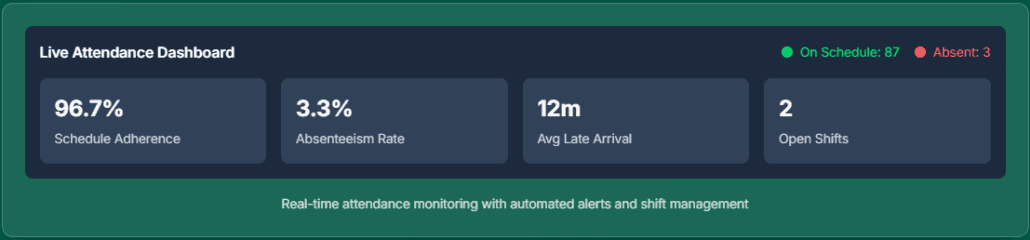
- Dashboard shows who is on time, late, or absent right now
- Activity monitoring verifies employees are working, not just clocked in
- Overtime is tracked in real time with reports ready for payroll
Attendance That Works Without Extra Effort
Everything you need to track and manage attendance across your team.
Clock-In vs. Schedule Comparison
Actual clock-in and clock-out times are compared against scheduled shifts instantly. See who arrived on time, who was late, and who missed their shift — no manual checking.
Real-Time Attendance Dashboard
See who is currently working, who has not clocked in yet, and who is on leave — all from a single screen. No waiting for end-of-day reports.
Activity Verification
Periodic screenshots and keyboard/mouse activity tracking verify that team members are actively working during their shifts, not just clocked in with the timer running.
Attendance Reports & Export
Reports showing on-time, late, and missed shifts per team member. Filter by date range, team, or individual. Export as PDF or Excel for payroll and compliance.
Overtime Tracking
Daily and weekly hours are tracked continuously. When employees exceed standard thresholds, overtime is flagged and visible in reports — before payroll is due.
Leave-Aware Attendance
Approved leave is factored into attendance data. Planned absences are not counted as missed shifts, giving you an accurate picture of who is actually absent without notice.
How It Works
Start tracking attendance across your team in minutes.
Set Up Schedules
Create shift schedules with start and end times. Set up recurring schedules for regular rotations. Configure activity monitoring preferences.
Employees Clock In
Team members start the timer through the desktop, mobile, or browser app. Their clock-in time is compared against the schedule automatically.
Review & Export
Review attendance, overtime, and activity reports from the dashboard. Export data as PDF or Excel for payroll and compliance reviews.
Frequently Asked Questions
Common questions about attendance management in HiveDesk.
HiveDesk compares actual clock-in and clock-out times against scheduled shifts. When team members start tracking time through the desktop, mobile, or browser app, their attendance is recorded automatically. There is no separate attendance system to maintain.
Remote employees clock in by starting the HiveDesk timer on their desktop or mobile app. Activity monitoring and periodic screenshots verify they are actively working during their shift — not just clocked in. Managers see attendance status from the dashboard regardless of employee location.
Attendance reports show on-time, late, and missed shifts for each team member. You can filter by date range, team, or individual. Overtime reports track daily and weekly hours. All reports export as PDF or Excel.
Yes. The dashboard shows who is currently clocked in, what they are working on, and how their clock-in time compares to their scheduled shift. You do not need to wait for end-of-day reports to know who showed up.
When employees request and receive approved time off, it is reflected in attendance tracking. Planned absences are not flagged as missed shifts. Managers see the full picture — who is on leave, who is working, and who is unaccounted for.
Yes. HiveDesk tracks daily and weekly hours so overtime is visible before payroll. Overtime reports show hours beyond standard thresholds for each employee, helping you manage costs and stay compliant with labor regulations.
Standalone attendance systems require a separate clock-in step. HiveDesk uses existing time tracking data — when employees start their timer, attendance is captured automatically. This means fewer tools, no extra steps for employees, and attendance that is always in sync with timesheets.
Yes. Break times are recorded in timesheets when employees log breaks during their shift. Managers can verify compliance with break policies and labor law requirements from the reports dashboard.
Desktop apps for Windows, macOS, and Linux. A mobile app for iOS with GPS tracking. A Chrome browser extension. And a web dashboard for managers to review attendance, reports, and manage teams.
Most teams are up and running the same day. Set up shift schedules from the web dashboard, have team members download the app, and attendance tracking begins as soon as they start their first timer.
Related Pages
Workforce Management Software
Full workforce management platform — scheduling, attendance, time tracking, and reporting in one tool.
Workforce Scheduling
Create shifts, set up recurring schedules, and track adherence against actual clock-in data.
Leave Management
Time-off requests, approvals, and balance tracking — integrated with attendance data.
Ready to Get Started?
Join teams worldwide who trust HiveDesk for workforce management, time tracking, and employee monitoring. $5/user/month, all features included.