

Know What Your Team Is Working On — Without Micromanaging
You are responsible for your team's output, but you do not have time to chase status updates all day. HiveDesk gives you a live view of your team's activity, tasks, and schedules — so you can lead effectively and step in only when needed.
No credit card required · $5/user/month · All features included

Leading a Team Should Not Mean Chasing Status Updates
As a team lead, you are caught between management expecting results and agents needing support. You need visibility into your team without spending all day checking in on every person.
What team leads struggle with
- Constantly messaging agents for status updates wastes everyone's time
- No way to see who is working, idle, or away without asking directly
- Task progress is invisible until agents report it themselves
- Remote team members feel disconnected and hard to track
- Timesheet review takes hours because agents submit incomplete data
- Schedule changes and time-off requests handled through back-and-forth messages
How HiveDesk solves it
- Live dashboard shows your team's status — no need to ask
- Activity levels and screenshots reveal who is focused and who needs help
- Task tracking shows progress without requiring manual status reports
- Same tools for remote and in-office — consistent visibility everywhere
- Timesheets auto-generated from tracked hours — review takes minutes, not hours
- Leave requests and schedule changes managed through a built-in workflow
Daily Team Monitoring
Your team's status at a glance, updated in real time
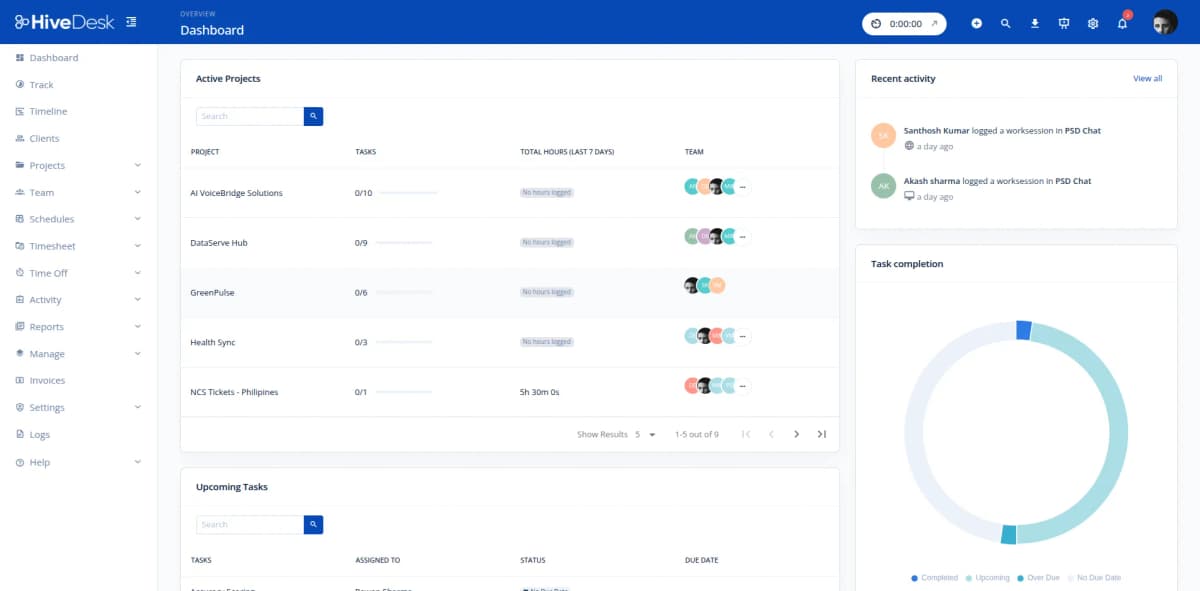
Open the HiveDesk dashboard and see your entire team. Who is online, who is idle, who is working on what task, and how many hours they have logged today. Activity levels show you which agents are actively working and which might need a check-in. No messages, no meetings, no interruptions — just open the dashboard.
- Real-time view of all team members and their current status
- Activity levels show focus and engagement without interrupting
- See hours logged per agent for today, this week, or any date range
- Drill into individual agents to review screenshots and task history
- Works the same for remote and in-office team members
Task Assignment & Progress
Assign work, track time against it, see progress
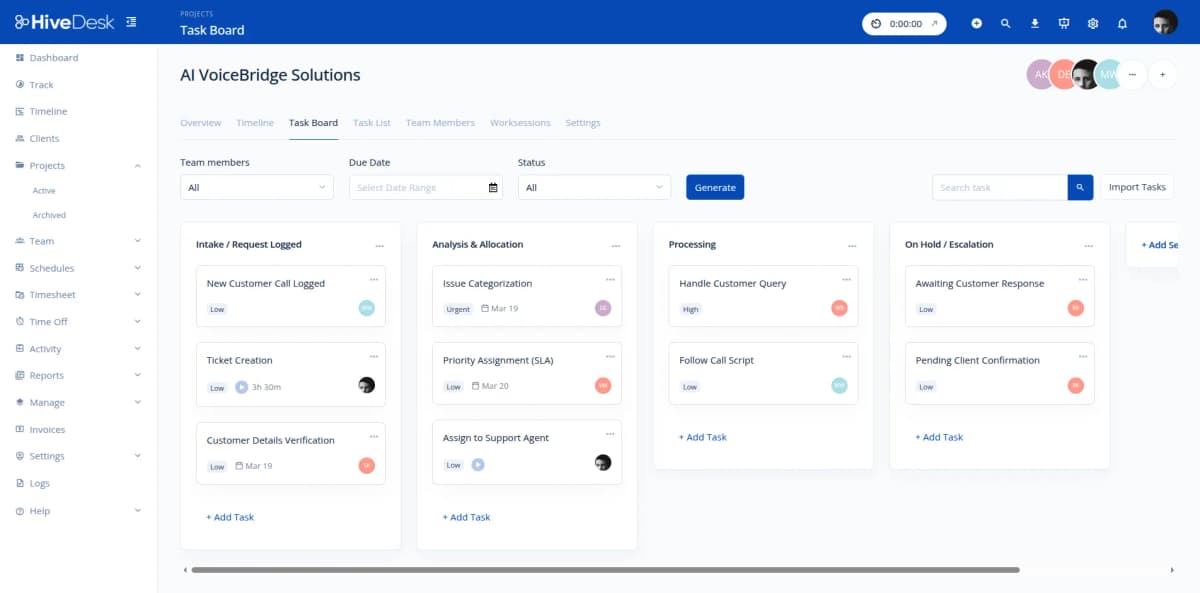
Create projects and tasks for your team. Assign agents to specific work items. As they track time, hours are automatically allocated to the assigned tasks. You see which tasks are being worked on, how much time has been invested, and which agents are carrying the load. Task boards give you visual progress tracking without requiring manual updates from your team.
- Create tasks and assign them to specific team members
- Time tracked automatically against assigned tasks
- Visual task boards show work-in-progress status
- See time invested per task — no manual status reports needed
- Identify bottlenecks and redistribute work as needed
Timesheets & Schedules
Approve timesheets in minutes and manage schedules in one place
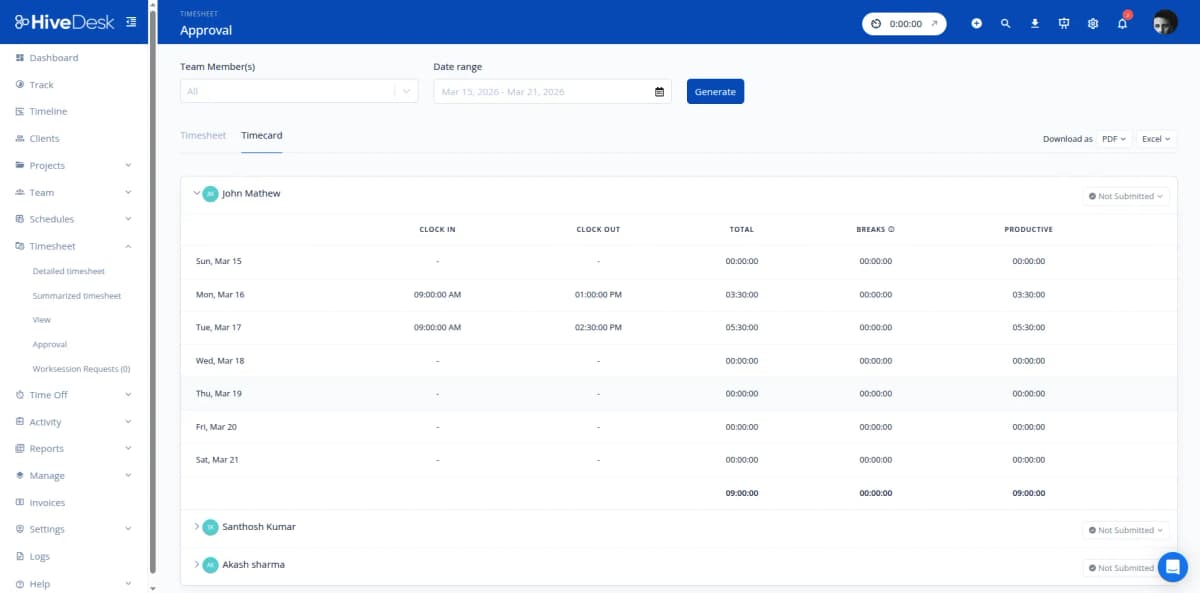
HiveDesk generates timesheets from tracked hours — no chasing agents for submissions. Review your team's hours, verify tasks, and approve for payroll. Schedule management is just as simple: create shifts, assign agents, and handle time-off requests through the same dashboard. Everything your team needs is in one place.
- Auto-generated timesheets from tracked hours — no manual submissions
- Review and approve timesheets with one-click workflow
- Create shifts and assign agents to scheduled coverage
- Attendance tracking compares actual clock-ins against the schedule
- Approve or decline time-off requests from a centralized queue
Everything a Team Lead Needs. $5/User/Month.
One plan with every feature included. No tiers, no hidden fees, no per-feature upsells.
Real-Time Dashboard
See which agents are online, their activity levels, and current tasks. Get a live overview of your team from one screen.
Task Assignment
Create tasks, assign them to agents, and track progress. See which tasks are in progress and how much time has been spent.
Automatic Time Tracking
Agents track hours on desktop, mobile, or browser. Time allocated by project and task automatically — no manual entries.
Activity Monitoring
Periodic screenshots and activity levels during work sessions. Verify agent focus without standing over their shoulder.
Shift Scheduling
Create and assign shifts for your team. Track attendance against scheduled shifts. Manage recurring schedules.
Timesheets & Approval
Review and approve auto-generated timesheets for your team. Verify hours and tasks before they go to payroll.
Trusted by Teams Across 6 Continents Since 2011
HiveDesk has been instrumental in helping us manage our remote team effectively. The automatic time tracking and screenshot features give us the visibility we need without micromanaging. Setup was straightforward and our team adopted it within a day.
Frequently Asked Questions
Common questions about HiveDesk for contact center team leads.
HiveDesk provides a real-time dashboard showing which of your agents are online, their activity levels, and what they are working on. Instead of sending status-check messages or hovering over desks, you open one screen and see your entire team. Periodic screenshots provide a record of work if you need to review it, but the dashboard gives you the daily visibility you need at a glance.
Yes. Create projects and tasks in HiveDesk and assign them to specific agents. As agents work and track time, their hours are allocated against assigned tasks. You can see which tasks are in progress, how much time has been spent, and who is working on what — all from the dashboard.
HiveDesk auto-generates timesheets from tracked hours. As a team lead, you review your team's timesheets, verify the hours and tasks, and approve or send them back for correction. The approval workflow ensures timesheets are accurate before they reach payroll.
Yes. Create shift schedules and assign your agents to shifts. Set up recurring schedules for regular rotations. HiveDesk tracks attendance by comparing clock-in/out times against scheduled shifts, so you know who arrived on time, who was late, and who did not show up.
Agents submit time-off requests through HiveDesk. As their team lead, you receive a notification and can approve or decline the request. Approved leave appears on the schedule and balances update automatically. You always know who will be available on any given day.
Yes. The dashboard shows real-time activity levels for each agent. You can also review periodic screenshots from any work session. This helps you verify that agents are focused during their shifts and gives you objective data for performance conversations.
Yes. HiveDesk has native apps for Windows, macOS, Linux, iOS, and a Chrome browser extension. Your remote agents use the same tools and are monitored the same way as in-office agents. You get consistent visibility regardless of where your team members work.
HiveDesk costs $5 per user per month — one plan with every feature included. No tiers, no per-feature upsells, no hidden fees. You get time tracking, task management, screenshots, scheduling, attendance, leave management, and reporting. There is a 14-day free trial with no credit card required.
Related Resources
Role-Specific Solutions
Contact Center Solutions
Ready to Get Started?
Join teams worldwide who trust HiveDesk for workforce management, time tracking, and employee monitoring. $5/user/month, all features included.