

Run Your BPO Profitably. Track Every Billable Hour. Prove Every Minute.
Your BPO manages agents across multiple client accounts, time zones, and shift patterns. HiveDesk tracks every billable hour by client automatically, verifies work with screenshots, and generates the billing reports your clients expect. Stop leaving revenue on the table.
No credit card required · $5/user/month · All features included

BPO Time Tracking Is Broken. Here's Why.
Most BPOs rely on manual timesheets, spreadsheets, or honor-system tracking. The result: billing disputes, revenue leakage, zero visibility into agent productivity, and clients who question every invoice.
Without BPO time tracking
- Agents self-report hours — you bill based on guesswork, not data
- Billable hours slip through the cracks across multiple client accounts
- Clients dispute invoices because you cannot prove how hours were spent
- Remote and offshore agents work without visibility or accountability
- Scheduling 24/7 coverage across time zones requires spreadsheets and manual coordination
- Compliance risks multiply as you operate across different labor law jurisdictions
With HiveDesk
- Time is captured automatically — every billable minute tracked by client and project
- Per-client timesheets generated from actual tracked data, not manual entry
- Screenshot reports give clients verifiable proof of work alongside every invoice
- Real-time dashboards show who is working on which client account right now
- Shift scheduling with attendance tracking across time zones and client accounts
- Audit-ready records of hours, breaks, and overtime for labor law compliance
Multi-Client Billing
Track every billable hour across every client account
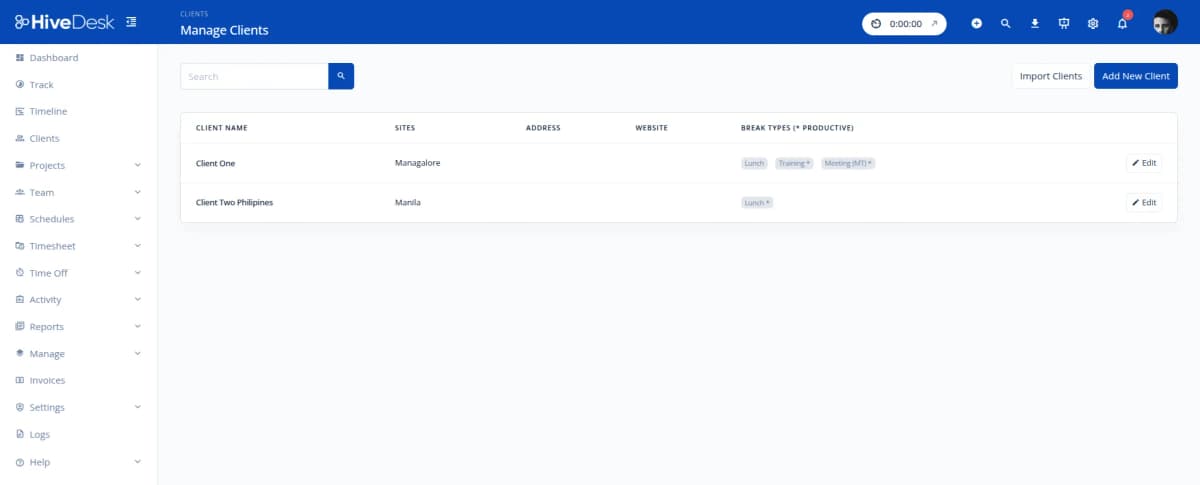
BPOs lose revenue when billable hours go untracked or underbilled. HiveDesk captures time automatically as agents work — organized by client account, project, and task. Agents switch between client projects with one click. At billing time, pull per-client timesheets that account for every minute.
- Organize projects by client account, process, and campaign
- One-click switching between client projects throughout the shift
- Separate billable client hours from internal non-billable time
- Per-client time reports ready for invoicing and account reviews
- Track time on Windows, macOS, Linux, iOS, or Chrome browser
Proof of Work
Bill clients with proof, not promises
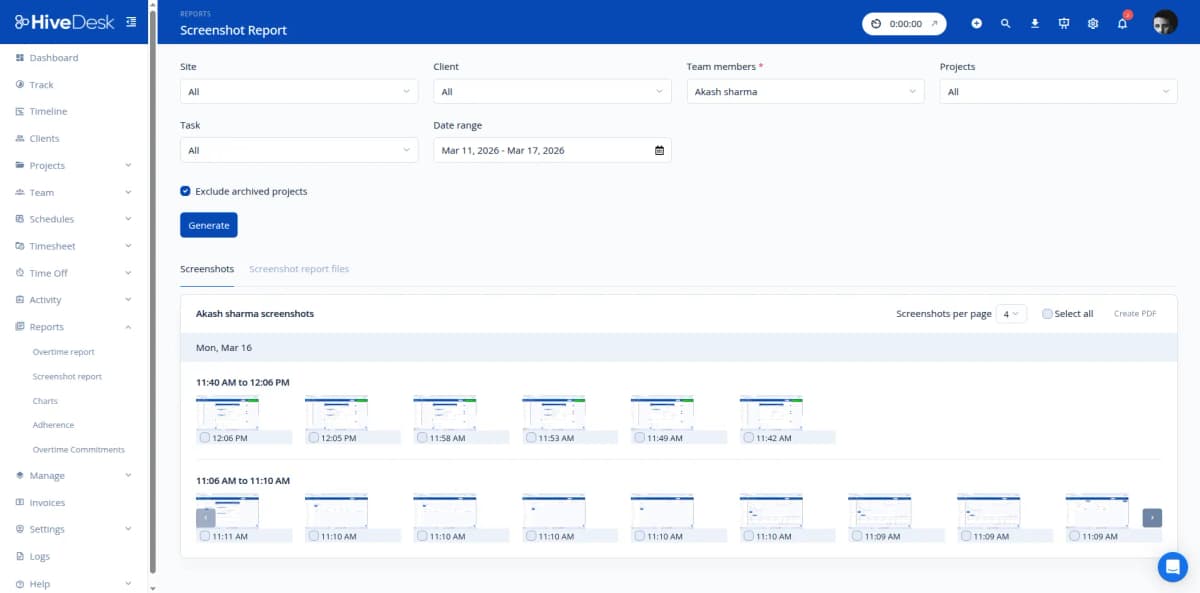
When clients question where their billed hours went, you need more than a spreadsheet. HiveDesk gives you verified time records backed by periodic screenshot reports. Share them alongside your invoices to eliminate billing disputes, justify every hour billed, and build the trust that retains long-term client relationships.
- Periodic screenshots serve as verifiable proof of work for clients
- Per-client timesheets show hours by agent, task, and date range
- Export billing reports as PDF or Excel — ready for invoices
- Eliminate revenue leakage from forgotten or unlogged billable hours
- Activity levels show productive time vs idle time per agent
Shift Scheduling & Attendance
Schedule 24/7 operations across time zones and clients
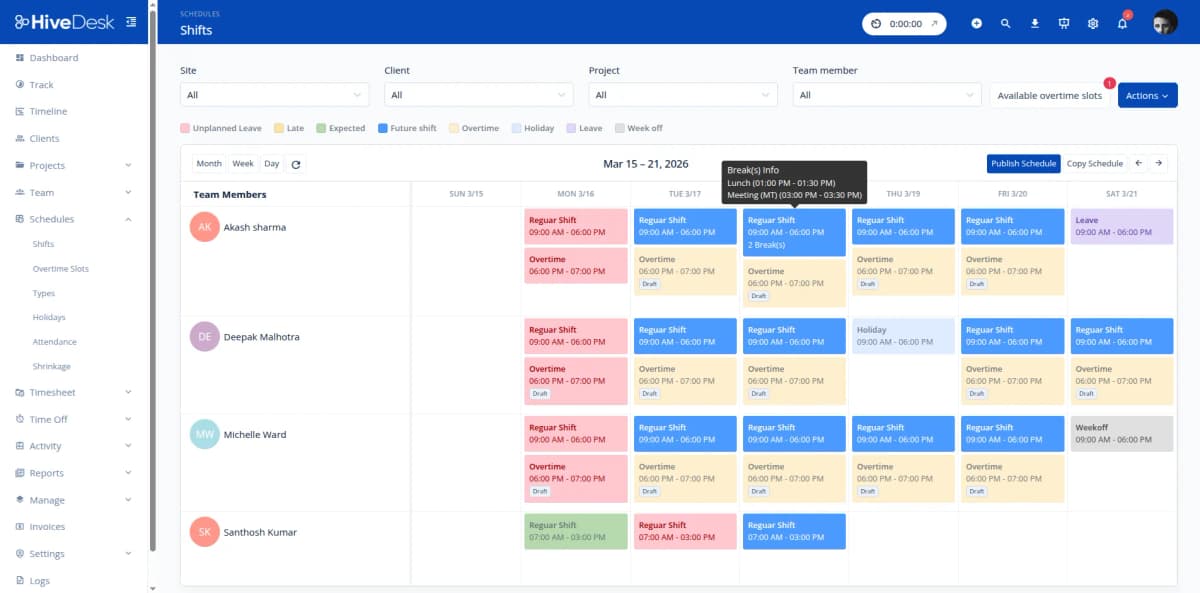
BPOs run around the clock across multiple time zones. HiveDesk lets you create shift schedules for different client accounts, track attendance against those schedules, and manage leave requests — all from one dashboard. No more spreadsheet-based scheduling that breaks when agents call in sick.
- Create separate shift schedules per client account
- Track schedule adherence — see who clocked in on time vs late
- Multi-timezone support for distributed BPO operations
- Leave management with approval workflows and balance tracking
- Attendance reports for payroll and compliance
Timesheets & Payroll
From tracked hours to payroll in minutes
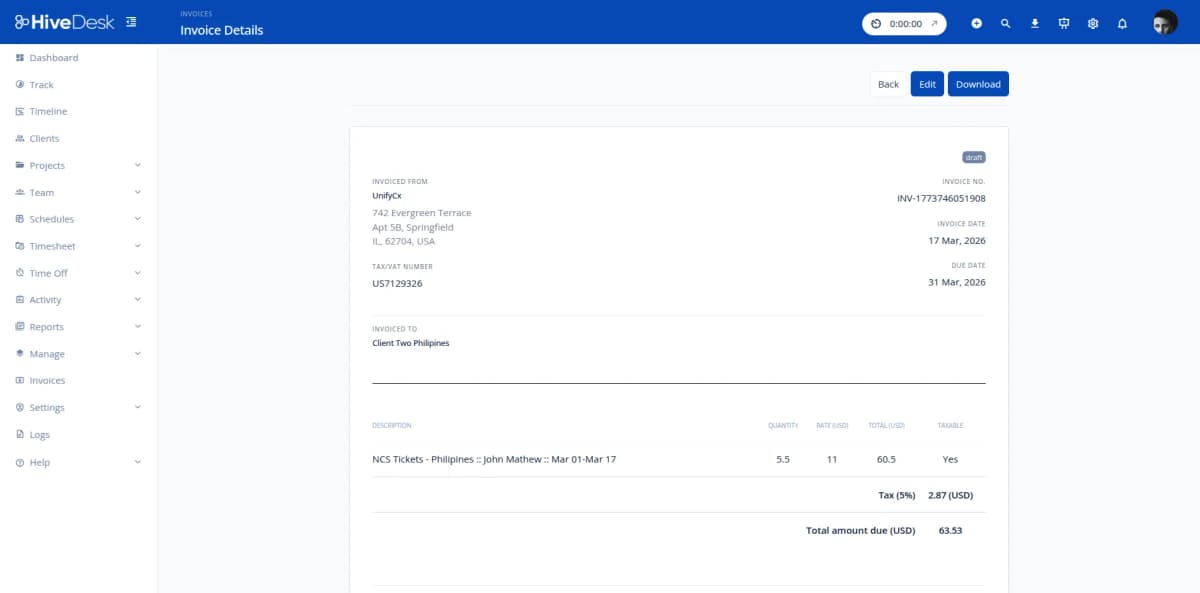
Stop manually calculating hours for hundreds of agents across client accounts. HiveDesk auto-generates timesheets from tracked time, runs them through a manager approval workflow, and exports clean data for your payroll software. Overtime, attendance, and time-off data are all included.
- Auto-generated timesheets with built-in approval workflow
- Manager review and approve before payroll processing
- Overtime hours tracked and flagged automatically
- Export approved timesheets as Excel for any payroll software
- Per-client cost tracking for profitability analysis
How BPOs Use HiveDesk
Whether you run inbound support, outbound sales, or back-office processing — HiveDesk adapts to how your BPO operates.
Inbound BPO
Customer service, technical support, and helpdesk teams handling inbound calls and tickets across multiple client accounts. Track agent hours per-client to bill accurately and staff appropriately.
- Track time by client for accurate billing
- Monitor agent activity during customer interactions
- Schedule shifts to match client call volume patterns
Outbound BPO
Sales, lead generation, collections, and telemarketing teams making outbound calls for clients. Prove agent productivity with time and activity records that justify billed hours.
- Verify agent productivity with screenshots and activity data
- Generate per-client time reports for campaign billing
- Track campaign hours separately from administrative time
Back-Office BPO
Data entry, document processing, accounting, and administrative teams handling back-office functions. Track hours against specific client processes and verify work quality through periodic screenshots.
- Track time across multiple back-office processes per client
- Screenshot verification for data entry and processing quality
- Timesheet reports that tie hours to specific client deliverables
Multi-Client Operations
BPOs juggling agents across multiple client accounts, time zones, and shift patterns. One platform to manage scheduling, time tracking, attendance, and billing across your entire operation.
- Real-time dashboard across all client accounts
- Per-client scheduling with shift rotation management
- Consolidated reporting for internal management and per-client billing
Everything Your BPO Needs. $5/User/Month.
One plan with every feature included. No tiers, no hidden fees, no per-feature upsells.
Automatic Time Tracking
One-click timer on desktop, mobile, and browser. Time is recorded by client, project, and task — no manual entries or end-of-shift guesswork.
Activity Monitoring
Periodic screenshots and activity levels verify that billed hours reflect actual work. Build client trust with objective, shareable reports.
Employee Scheduling
Create shift schedules per client account. Manage shift rotations, track schedule adherence, and balance agent workloads across accounts.
Timesheets & Billing
Auto-generated timesheets with manager approval. Export per-client reports as PDF or Excel for invoicing and account reviews.
Attendance & Leave
Track attendance automatically from clock-in data. Manage PTO requests, leave balances, and approvals across your entire BPO operation.
Real-Time Dashboards
See which agents are online across all client accounts, their activity levels, and hours logged. Live overview of your entire operation.
Trusted by Teams Across 6 Continents Since 2011
In today's world, remote work is a given. We use this software to handle those challenges. We tried a lot of the competitors and for many reasons HiveDesk won. Plus, the team loves their support. Fast and attentive. We love HiveDesk. It allows us to track people's use and find areas of weakness. Their price level is perfect for us, and we love their reporting.
We have used every time tracking software under the sun, and they all fall short in some area that we need, but overall HiveDesk has met our needs. Their PDF screenshot reports are clean, easy to use and understand. Our clients prefer them over the complicated reports of other systems.
Simple Pricing for BPO Operations
One plan with all features included. Scale your team up or down as client needs change.
All features included
- Automatic time tracking across all devices
- Activity monitoring with screenshots
- Employee scheduling
- Attendance & leave management
- Project & task tracking by client
- Timesheet generation & approval
- Reporting & analytics dashboards
- Asana integration
No credit card required
Frequently Asked Questions
Everything you need to know about time tracking for BPO operations.
Create separate projects for each client account. Agents select the client project before starting their timer, and HiveDesk captures every minute automatically. At billing time, pull per-client timesheets that show hours broken down by agent, task, and date range. No manual entry, no end-of-shift guesswork.
Yes. HiveDesk takes periodic screenshots while agents work on client projects. These screenshot reports serve as verifiable proof of work you can share alongside invoices. Clients see exactly what their billed hours were spent on — reducing billing disputes and building trust. Screenshot frequency is configurable, and agents always know when tracking is active.
Create shift schedules for different client accounts and time zones. Assign agents to specific shifts, track schedule adherence in real time, and monitor who clocked in on time versus late. HiveDesk supports multiple shift patterns so you can staff 24/7 operations across different client accounts without spreadsheets.
Yes. Agents switch between client projects with one click — HiveDesk tracks time per-client automatically. Managers see a real-time dashboard showing which agents are working on which client account at any moment. At the end of the billing period, pull per-client reports that account for every minute.
HiveDesk automatically tracks working hours, break times, and overtime for every agent. Generate audit-ready reports that show compliance with labor laws in different jurisdictions. Attendance records, leave balances, and time-off approvals are all maintained in one system.
Generate timesheets, activity reports, screenshot reports, attendance reports, and project time breakdowns. Filter by date range, client, team, or individual agent. Export as PDF or Excel — ready to attach to client invoices or share during account reviews.
HiveDesk takes periodic screenshots and tracks keyboard/mouse activity levels during work sessions. Managers can review screenshots to verify work quality and ensure agents are focused on client tasks during their shifts. Agents always know when monitoring is active — there is no hidden surveillance.
HiveDesk integrates with Asana for project and task management. You can track time directly inside Asana tasks, link tracked hours to specific deliverables, and keep your project management workflow intact while getting accurate time data for client billing.
HiveDesk costs $5 per user per month — one plan that includes every feature. No tiers, no per-feature upsells, no hidden fees. You get time tracking, screenshots, scheduling, attendance, leave management, task tracking, timesheets, and reporting. There is a free 14-day trial with no credit card required.
Most BPOs are up and running within a day. Sign up for a free trial, create projects for each client, set up shift schedules, invite your agents, and they start tracking time immediately. No complex onboarding, no IT department required. Desktop apps are available for Windows, macOS, and Linux, plus an iOS mobile app and Chrome extension.
Managing virtual assistants? See time tracking for virtual assistants.
Related Resources
BPO Guides
- What Is BPO? The Complete Guide →
- BPO Workforce Management Guide →
- BPO Client Billing: Accuracy & Profitability →
- Workforce Planning for BPOs →
- Call Center Workforce Management Guide →
- Contact Center Outsourcing Decision Framework →
- Work Culture in the Philippines: CX Guide →
- Strategic Outsourcing: The Complete Guide →
Templates
Ready to Get Started?
Join teams worldwide who trust HiveDesk for workforce management, time tracking, and employee monitoring. $5/user/month, all features included.