

Real-Time Visibility Into Every Agent, Every Shift, Every Metric
You run a contact center where every minute of agent time matters. HiveDesk gives you live dashboards, schedule adherence tracking, activity monitoring, and productivity reports — so you can optimize operations with data, not guesswork.
No credit card required · $5/user/month · All features included

Running a Contact Center Without Visibility Is Guesswork
You are responsible for service levels, agent productivity, and cost efficiency. But without real-time data, you are managing blind.
What operations managers struggle with
- No real-time visibility into which agents are working and which are idle
- Schedule adherence is tracked manually or not at all
- Agent shrinkage eats into productive hours with no way to measure it
- Remote agents are harder to monitor than in-office staff
- Timesheets are submitted days late with inaccurate or estimated hours
- Overtime costs creep up because you catch them after the fact
How HiveDesk solves it
- Live dashboard shows every agent currently online with activity levels
- Attendance reports compare clock-in times against scheduled shifts automatically
- Periodic screenshots and activity tracking expose idle time during shifts
- Same monitoring tools work for remote, hybrid, and in-office agents
- Timesheets are auto-generated from tracked hours — no manual entry needed
- Overtime is flagged in real time so you can intervene before costs spike
Real-Time Operations Dashboard
See your entire operation at a glance
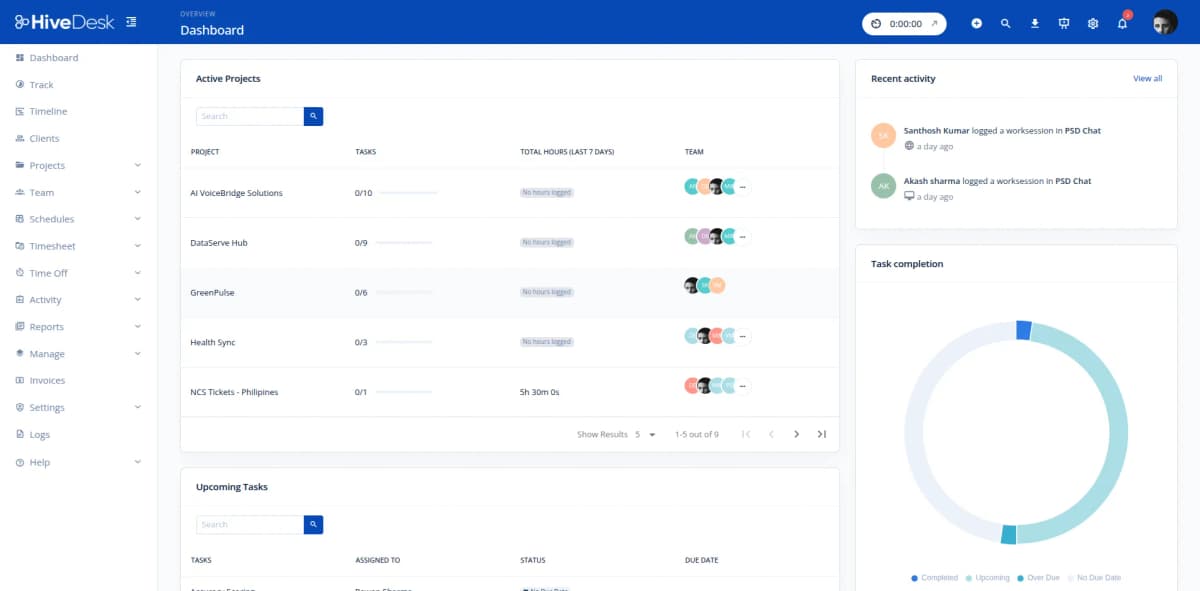
Stop pinging team leads for status updates. The HiveDesk dashboard shows you exactly who is online, what they are working on, and how active they are — updated in real time. Drill into individual agents, teams, or projects to investigate productivity patterns.
- Live view of all online agents with current activity levels
- Filter by team, department, or location
- See hours logged today, this week, or any custom date range
- Identify underperforming shifts before they impact service levels
- Works across time zones for distributed contact centers
Schedule Adherence
Know who showed up, who was late, and who missed their shift
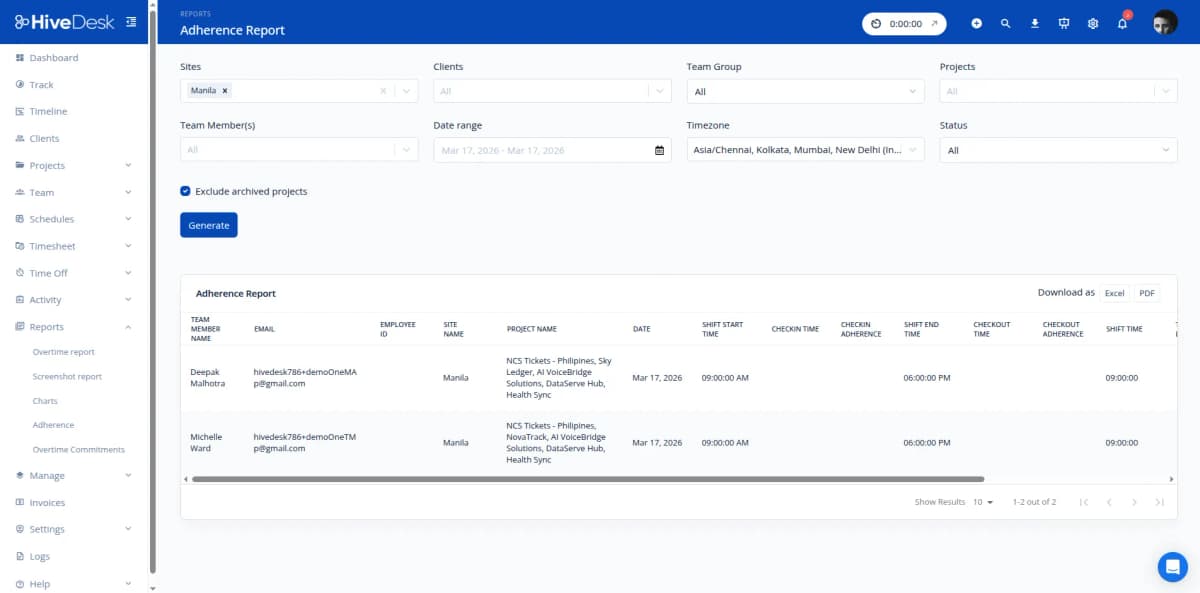
Create shift schedules in HiveDesk and let the system do the rest. When agents clock in and out, HiveDesk compares actual times against the schedule. The adherence report shows you exactly where gaps exist — late arrivals, early departures, and no-shows — so you can address patterns before they affect coverage.
- Create shifts and assign agents with recurring schedule support
- Automatic comparison of scheduled vs actual clock-in/out times
- Adherence reports by agent, team, or date range
- Track attendance patterns over weeks and months
- Manage time-off requests with built-in approval workflow
Activity Monitoring & Shrinkage
Measure productive time, reduce shrinkage
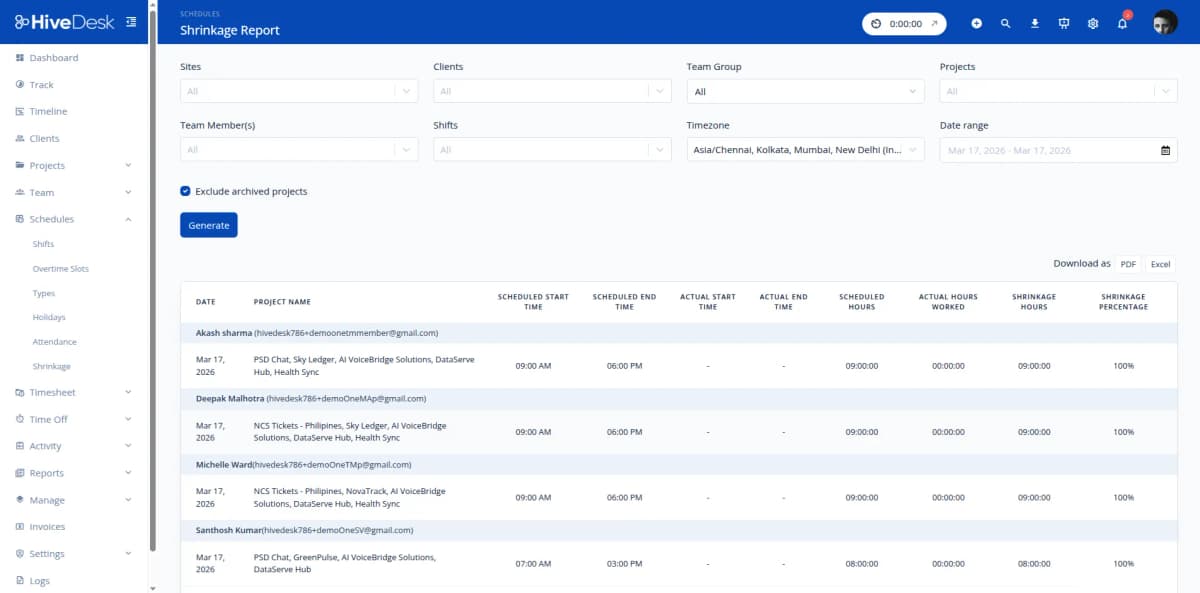
Agent shrinkage — the gap between scheduled hours and productive work — is one of the biggest cost drivers in contact centers. HiveDesk tracks activity levels and captures periodic screenshots during work sessions. You get data on how agents actually spend their time, so you can coach effectively and reclaim lost productivity.
- Periodic screenshots during work sessions for accountability
- Activity level tracking shows productive vs idle time
- Shrinkage reports quantify the gap between scheduled and productive hours
- Screenshot frequency is configurable — agents always know when tracking is active
- Use data for coaching conversations, not surveillance
Everything You Need to Run Operations. $5/User/Month.
One plan with every feature included. No tiers, no hidden fees, no per-feature upsells.
Real-Time Dashboards
See which agents are online, their activity levels, and hours logged. Get a live overview of your entire contact center from one screen.
Activity Monitoring
Periodic screenshots and activity levels during work sessions. Verify agent work and identify productivity patterns across shifts.
Automatic Time Tracking
Agents track hours using desktop, mobile, or browser apps. Timesheets generated from actual tracked time for accurate payroll.
Shift Scheduling
Create shifts, assign agents, and set up recurring schedules. Track attendance against scheduled shifts for adherence reporting.
Attendance & Leave
Automated attendance from clock-in data. Leave policies, balances, and time-off requests with manager approval workflow.
Reports & Export
Timesheets, activity, attendance, overtime, and adherence reports. Filter by date, team, or agent. Export as PDF or Excel.
Trusted by Teams Across 6 Continents Since 2011
HiveDesk has been instrumental in helping us manage our remote team effectively. The automatic time tracking and screenshot features give us the visibility we need without micromanaging. Setup was straightforward and our team adopted it within a day.
Frequently Asked Questions
Common questions about HiveDesk for contact center operations managers.
The HiveDesk dashboard shows you which agents are currently online, their activity levels, and what they are working on. Periodic screenshots capture agent screens during work sessions. You see a live overview of your entire contact center operation from a single screen — no switching between tools or waiting for end-of-day reports.
HiveDesk tracks actual hours worked with activity level monitoring and periodic screenshots. You can compare scheduled hours against actual productive hours to identify shrinkage patterns. When you see gaps between scheduled and productive time, you have the data to address them in coaching sessions rather than relying on assumptions.
Yes. Create shift schedules and assign agents to shifts. HiveDesk compares actual clock-in and clock-out times against scheduled shifts, so you can see who arrived late, left early, or missed a shift entirely. The attendance report gives you adherence data for any date range, team, or individual agent.
Organize agents into teams by department, queue, location, or function. View dashboards and reports at the team level or across the entire organization. HiveDesk works across time zones, so you can manage distributed contact center operations from a single account.
HiveDesk generates timesheets, activity reports, attendance reports, adherence reports, overtime reports, and project/task reports. Filter any report by date range, team, or individual agent. Export as PDF or Excel for payroll processing, client billing, or compliance documentation.
HiveDesk tracks total hours worked per agent per day and per week. When agents exceed standard hours, overtime is flagged automatically in timesheets and reports. Operations managers can review overtime data before approving timesheets, helping you control labor costs and stay compliant with overtime regulations.
Yes. HiveDesk has native apps for Windows, macOS, Linux, iOS, and a Chrome browser extension. Remote agents track time from home, and in-office agents use the same tools at their workstations. You get consistent data and reporting regardless of where agents are located.
Most contact centers are operational within a day. Sign up for a free trial, create teams, set up shift schedules, and invite agents. Agents download the desktop or mobile app and start tracking time immediately. There is no complex onboarding or IT integration required. HiveDesk costs $5/user/month with all features included.
Related Resources
Role-Specific Solutions
Contact Center Solutions
Ready to Get Started?
Join teams worldwide who trust HiveDesk for workforce management, time tracking, and employee monitoring. $5/user/month, all features included.